All-in-One WordPress Theme
for Video Streaming Websites
Create your own YouTube-style site with channels, live streams, pay-per-view videos, and AI site building with your own AI account.


Popular Video Site Features
Uploads, live streams and pay-per-view all ship inside the Video Theme.
Videos and Shorts
Members upload a video or a Short from the Create menu, and it goes straight onto their channel.
YouTube & Vimeo Links
Paste a YouTube or Vimeo link and it plays on your own watch page like any other video.
Pay-Per-View
Put a price on any video. Viewers pay once to unlock it and keep it for good.
A Video Site
for Every Niche
From cooking and gaming to church services and staff training, each kind of video site has its own look and sample videos. Choose one and upload your first video.
Video Platforms & Streaming
Your own YouTube-style site, with channels and subscriptions.

Real Estate Video Tours
Walk buyers through every home on video.

Live Streaming
Go live from the browser and keep the replays.

Cooking & Recipe Channels
Recipe videos, step by step, from your own kitchen.

Gaming & Esports
Let-plays, highlights and live matches.

Church & Faith
Stream services and keep every sermon online.

Corporate Training
Training videos for your team or your customers.

Choose Your Video Design
Every design is ready for real videos: swap in your own channels, uploads and colours.


The Video Site Playbook
How to plan, build and grow a video website people subscribe to, and come back to watch. 34 pages, from choosing a niche to your first 90 days.
Make Money From Your Video Site
Sell single videos, let creators pay to be seen and keep every penny, with no revenue share.
Pay-Per-View Videos
Put a price on any video. Viewers unlock it once and keep it, and the money goes straight to you.
Promoted Videos
Creators pay credits to put a video at the top of search for 7, 14 or 30 days, marked Featured.
Sign In to Watch
One switch puts every video behind a free account, so each viewer joins your list before they watch.
146 Payment Gateways
Viewers pay for videos and credits through PayPal, Stripe or any of 144 other gateways, straight into your own account.

No Revenue Share
It’s your own server, so nobody takes a cut of your sales or can demonetise your videos.
Easy Search, Watch Pages That Keep Viewers
Viewers should find a video fast, then like it, save it and subscribe without leaving the page.
Search Every Video
Viewers search by keyword and category and see every video with its length and its channel.
A Watch Page Like YouTube
Every video gets its own watch page with the player, the channel, a like button and Watch later.
Playlists
Creators group their videos into named playlists and add a video to one right from the upload form.
Your Library
Viewers keep Watch later, History, Liked videos and their subscriptions, one click away.
Uploads, Links and Live, in One Place
Go live from the browser. Creators stream with just a camera and a browser, viewers find them under Live now, and the stream plays on its own watch page.
Paid videos stay paid. A pay-per-view video is never a public file: only the viewer who unlocked it gets a link, and it runs out soon after.
A Dashboard for Viewers and Creators
A library for viewers, and videos, views, new subscribers and comments for creators.
For Viewers

For Creators

What Members Get in Their Account
Viewers keep their videos, likes and settings in one place without ever seeing WordPress, with the checks you require.
Verification tools
Ask new members for a confirmed email or phone, photo ID or your own sign-off before their account goes live.
Two-factor login
A sign-in code protects member accounts, and staff can be made to use one.
Unlocked videos
Every video a viewer paid for stays in their account, ready to watch again.
Liked videos
Viewers like a video on its watch page and find it again under Liked videos.
Watch later
Viewers save a video for later and play it from their queue when they have time.
Account & privacy
Members pick which emails they get, see new sign-ins and can close their account, held for 30 days first.
Every Video, Channel and Sale in One Admin
Approve uploads, look after your creators and see what each video earns from one dashboard.
Try the admin demoOne Dashboard
Track new videos, new members and revenue over the last week, month or quarter, with anything waiting for you at the top.

Manage Every Video
All your videos side by side with their status and how complete they are, filtered by status in a click.

Edit Any Video
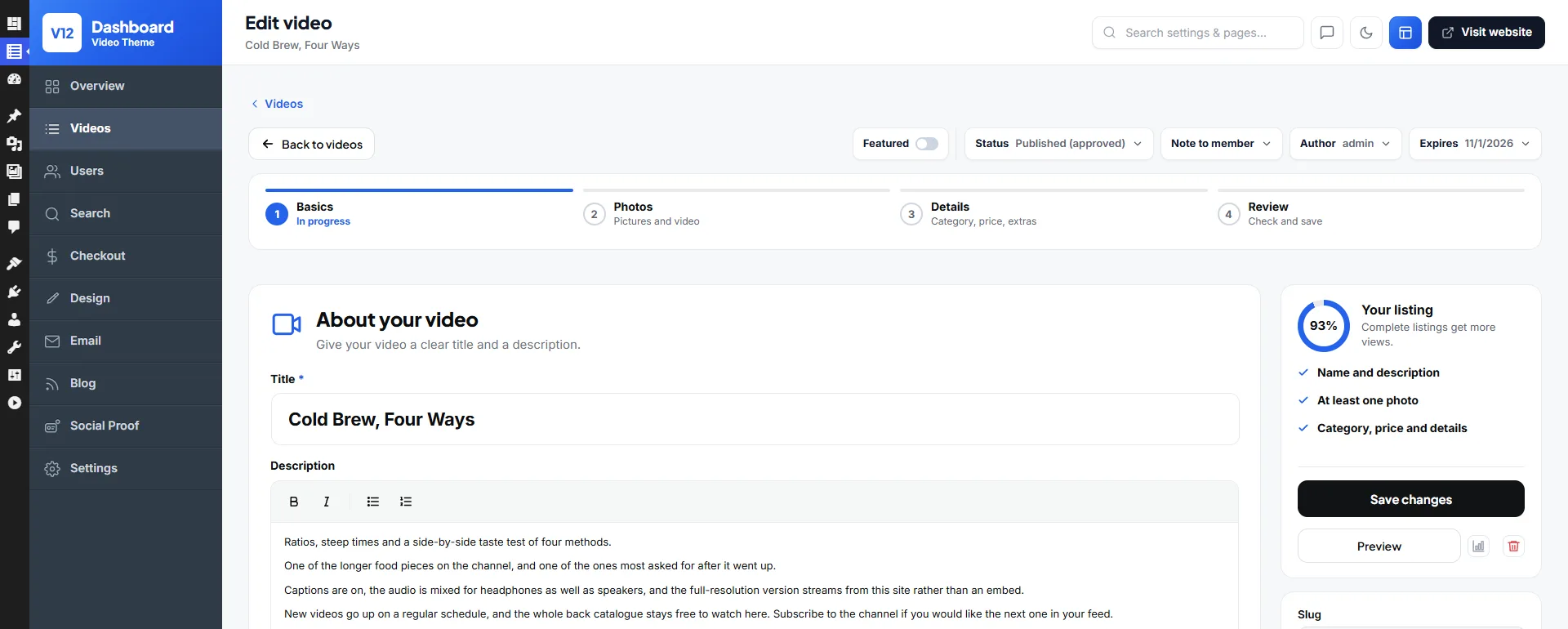
Title, description, photos, video and category, step by step, with the Featured switch and status at the top.
Search Filters
Choose which filters viewers can search by and set the order they see them in.

Design Your Video Pages
Site Generator
With your own AI account connected, describe your video site and the generator drafts every page. Ask it for a trending row or a new hero player, or arrange the blocks by hand.

Logo & Brand Colours
Put your site name, logo and colours on every page, checked in a live preview first.

Your Video Site, Your Look
Make it a big YouTube-style platform or a channel for one creator, whichever suits your viewers.
Your Colours, Fonts & Logo
Set your brand colours and type, and watch pages, channels and search results all match.
Works with Elementor
Designing in Elementor? Drag the 150+ video blocks, like hero players, trending rows and channel lists, straight onto your Elementor pages.
Build Your Site Without Extra Plugins
Lay out your homepage, category pages and video rows in the theme’s own editor, then go live.
Ready on Day One
Emails, translations, anti-spam and sign-in options for your shoppers are already in place.
Automatic Emails
Members get a welcome email, a note when their video is approved and a password reset when they need one.
Any Language
Run a video site for viewers in another country with 13 ready-made languages, or add another.
Works on Any Screen
Most viewers watch on their phone, so every watch page, Short and channel is sized to fit.
One-Click Demo Import
Load a ready-made video site with sample videos and channels, then upload your own.
Unlimited Installs
Run separate video sites, say one for cooking and one for training, on the same licence.
Video Tutorials
Watch how to upload videos, set prices and build your pages in short video guides.
Social Proof
Small pop-ups show new likes and comments, and how many people are watching right now.
SMS Messages
Send members their security codes by SMS through Twilio, Vonage, MessageBird or Plivo.
Social Login
Viewers sign up in seconds with Google, Facebook, Twitter or Apple, ready to subscribe straight away.
Spam Protection
Bot accounts are kept out with reCAPTCHA and a ban on throwaway email addresses.
Built-In Blog
Write behind-the-scenes posts and round-ups to bring in viewers from search engines.
Reviews & Ratings
Viewers leave star reviews on videos, so the best ones are easy to spot.
Build Your Own YouTube: Own It, Don't Rent It
On YouTube or a hosted platform the audience, the rules and a share of your money are someone else's. Here they are yours.
| Video Theme | YouTube | Uscreen / Vimeo OTT | |
|---|---|---|---|
| Price | $99 one-time | Free | From ~$149/mo |
| You own the platform & audience | Yes | No — Google owns it | No — hosted for you |
| Your branding & your own domain | Yes | youtube.com/@you | Their subdomain / app |
| Keep 100% of your revenue | Yes | Google takes ~45% of ads | Monthly + transaction fees |
| Sell subscriptions & memberships | Built in | Eligibility-gated | Yes |
| Can be demonetised or removed | No — it's your server | Yes, anytime | Per their terms |
| Ongoing fees | None | Free | Monthly subscription |
How to Build a Video Sharing Website with WordPress
Six simple steps to your own video sharing website. Members upload videos to their own channels, viewers subscribe, and you make money from your own site. It all runs on WordPress, with no coding required.
- 1
Upload the Video Theme
Upload the theme zip under Appearance → Themes → Add New → Upload Theme and activate it. It runs on any standard WordPress hosting.
- 2
Activate Updates with Your Licence Key
Enter your licence key in the admin area to switch on updates and support. One key covers unlimited video sites you own.
- 3
Rebuild the Demo Video Site
One click rebuilds the live demo with sample channels, categories and video pages. You customise a working site instead of building from blank.
- 4
Add Videos or Open Member Uploads
Upload your own videos or embed them from YouTube and Vimeo, and switch on member registration so people can create channels and upload their own.
- 5
Set Up Channels, Memberships and Monetisation
Organise channels and categories, then turn on paid subscriptions, pay-per-video access, featured placement or ad spots and set your pricing.
- 6
Customise the Design with Elementor
Style the headers, home page and video layouts with the ready-made video blocks in Elementor, then launch your video sharing website.
WordPress Video Theme FAQ
Common questions from people planning a video website.
Install the WordPress Video Theme and import the demo. Then either add videos yourself or open registration so members upload their own. Channels, categories, players and member accounts are already wired together, so a working video site can be live the same day with no coding.
Yes. That's what the theme is built for. You get YouTube-style channels, video pages with related-video sidebars, subscriptions, likes and star-rated reviews, plus search by category and keyword. It all sits on your own domain instead of inside someone else's platform.
Install the WordPress Video Theme, import the demo and open member registration. You then have a working YouTube clone with channels, front-end uploads, subscriptions, reviews and search, on your own domain. Unlike a hosted YouTube-clone script, there's no coding. You manage everything from the WordPress admin and keep 100% of what you earn.
Yes. Beyond YouTube-style sharing, you can run a subscription video-on-demand or VOD site. Put videos or whole channels behind a paywall, sell monthly memberships, and stream from your own server or embed from external hosts. It's a self-hosted way to build a video streaming website without a monthly platform fee.
Yes. Hosted platforms keep your audience and take a cut or a monthly fee. This theme puts the same tools, including channels, subscriptions, paywalls and monetisation, on a WordPress site you own outright. You pay once, use your own branding and domain, and take no revenue share on your sales.
Yes. Members register, create a channel and upload from the front end, and you decide whether uploads publish instantly or wait for approval. Videos can be hosted on your own server or linked from YouTube and Vimeo, and an optional embed-code tab covers other hosts. So you're not forced to pay for heavy video storage from day one.
Yes. Members can go live from their browser with a webcam and mic, viewers watch on the video page, and each broadcast is recorded as a replay on the same page. A Live now page shows who is on air. Live streaming runs on your own Cloudflare Stream account, which Cloudflare bills separately, and it stays hidden until you add your account details.
Several ways are built in, and you can combine them. Sell paid membership plans and charge per video with pay-per-view, where paid files stay in a private vault and stream through expiring links. Let creators pay to promote their videos, and run ad banners between the video grids. You set every price from the admin area and keep 100%, with no platform taking a cut of your revenue.
Yes. Every page is editable in the free Elementor plugin. The theme ships with nearly 100 purpose-built video blocks, like hero banners, video grids, live-channel rows and category filters, that you drag into place to brand the site your way.
Yes. The one-click import rebuilds the live demo on your own domain, with sample channels, categories, video pages and menus included. You replace placeholder clips with real ones instead of starting from a blank site.
Yes. Uploading videos, approving member channels, setting membership prices and moderating reviews all happen in the admin area, and the design work happens in free Elementor. Step-by-step video tutorials and documentation cover the whole setup.
Yes. The video player, channel pages, search and upload forms all work on phones and tablets. Most viewers watch on mobile, and members can upload and manage their channel from a phone too.
Yes. A single User License covers unlimited video websites that you own. A tutorials site, a music-video site and a fitness channel can all run on one licence. If you build video sites for clients, the Developer License covers commercial and client work.
There's no free or "nulled" edition. On a membership site that stores user accounts and takes payments, a malware-laced nulled copy is the most expensive thing you could install. The real licence is one payment for unlimited installs, 6 months of updates and support, and a 14-day money-back guarantee.
Yes. There's a 14-day money-back guarantee. Import the demo, add a few videos and test the upload and membership flow on your own hosting. If it doesn't fit your plans, request a full refund within 14 days.
No. Video uploads, channels, memberships, subscriptions and monetisation are all part of the theme. Other setups bolt those together from several paid plugins. The design layer is the free version of Elementor. Beyond hosting and a domain, the only optional cost is extended updates after the first 6 months, at $49 per 6 months if you want it.
What Customers Say About the Video Theme
Video site owners give it 5.0 out of 5.
“Loving the new update, Version 10 is awesome!”
Alini Eva
“I had a few problems with setup but Chris was always there for help and assistance when I needed him! It was great from start to finish and was just what I was looking for.”

Helen Walters
Guides for Video Site Owners
- Video Sharing WordPress Themes in 2026: 7 Checked for Uploads, Channels and Paid AccessSeven video themes checked on three questions. Can members upload, can they run channels, and can you charge without a plugin? Plus the old favourites that are gone.
- How to Make a Website Like YouTube with WordPress: Three Routes ComparedWhat a YouTube-style site needs, three ways to build one on WordPress with a free setup, VidoRev or our Video Theme, and the moderation and hosting work after launch.
- VidoRev Alternatives in 2026: Five Video Themes and Plugins ComparedWhy buyers look past VidoRev, with a ten-month update gap and a $2,950 licence for paid sites, and how VidMov, BeTube, our Video Theme and two free tools compare.
- Video Theme or Video Plugins? Building a Paid Video Site on WordPressPresto Player, WpStream and Paid Memberships Pro against a dedicated video theme, with year-one costs and the ThemeForest licence most buyers miss.
- What It Costs to Host Videos for a WordPress Video Site: Bunny, Cloudflare, Mux, Vimeo, YouTubeOne 10-minute 1080p video with 10,000 views. What your own server, YouTube, Vimeo, Bunny Stream, Cloudflare Stream and Mux would cost, with the sums shown.
Related WordPress Themes
WordPress LMS Theme
Launch an online course & eLearning site with courses, lessons, quizzes and student enrolment, like Udemy or Teachable.
WordPress Stock Photography Theme
Sell stock photos & videos similar to Shutterstock, iStock or Adobe Stock.
WordPress Digital Download Theme
Sell digital downloads or build a marketplace similar to Themeforest, CodeCanyon or Gumroad.