All-in-One WordPress Theme
for AI Headshot Websites
Run your own AI headshot studio like HeadshotPro or Aragon AI. Members upload selfies, AI models on your own Replicate account make the photos, and credits pay for every batch.


Popular AI Headshot Features
The AI Studio, styles, credits and members area all ship inside the AI Headshot Theme. You connect your own Replicate account.
Step-by-Step AI Studio
Members choose what to make, add photos, pick styles and generate, one clear step at a time.
Ten AI Jobs
Headshots, cartoons, dating photos, pet portraits, avatars and more. Switch on the ones you sell.
Over 70 Ready Styles
Every style shows a man and a woman example. Mark the best ones Premium for members on a plan.
An AI Photo Site
for Every Niche
From business headshots and dating photos to pet portraits and restored family pictures, each kind of AI photo site has its own look and styles. Choose one and open your studio.
Professional Headshots
Sell LinkedIn-ready headshots made from a few selfies.

Company Headshots
Matching headshots with the same backdrop and light.

Dating Profile Photos
Natural, flattering photos for dating profiles.

Cartoon Headshots
Turn selfies into comic, flat or animated characters.

Pet Portraits
Paint pets as pop art, storybook or old-master portraits.

Photo Restoration
Repair and colourise old family photos.

Gamer Avatars
Redraw selfies as avatars for streaming and gaming.

Decades Portraits
A studio portrait from another decade.

Photo to Video
Turn a still portrait into a short video clip.

Choose Your AI Studio Design
Every design is ready for real members: swap in your own styles, prices and colours.


The AI Headshot Playbook
How to plan, build and grow an AI headshot website that turns a few selfies into paid studio portraits. 34 pages, from choosing a niche to your first 90 days.
Make Money From Your AI Photo Site
Sell credit packs and monthly plans at your own prices, while each batch costs you only a few cents on Replicate.
Sell Credit Packs
Members buy a pack of credits and spend them on each batch. You choose every pack’s name, size and price.
The Margin Is Yours
Each batch runs on your own Replicate account for a few cents. You set how many credits each job costs, so the difference is yours.
Monthly Plans
Sell membership plans that add credits every month, unlock Premium styles and choose which AI jobs each plan includes.
146 Payment Gateways
Members pay for credits and plans through PayPal, Stripe or any of 144 other gateways, straight into your own account.

Free Credits for New Members
Give every new member a few free credits so they try a batch, then sell them more.
From Selfie to Studio Headshot in Four Steps
Members pick what to make, add a few photos, choose their styles and get their images back in their own account.
Pick What to Make
Members start with a job, like a headshot, a cartoon or a restored photo, and see what each one costs before they begin.
Upload a Few Photos
Members add photos from their phone and tick your consent wording once before the first upload. The date is kept on record.
Results in My Images
Finished images land in the member’s My images page, and an “AI images ready” email tells them they are done.
Privacy Built In
Uploaded selfies are deleted after the days you set, and the copy sent to Replicate goes as soon as the batch finishes.
Runs on Your Own Replicate Account
You pay Replicate, not us. Paste your API key and every job runs on your Replicate account, billed by them at their own rates. There are no platform fees on top.
Your models, your prices. Each job comes set up with a recommended model. Swap in another Replicate model, and choose how many images a batch makes and how many credits it costs.
A Dashboard for Members and for You
Credits, images and plans for members, and batches, new members and credits spent for you.
For Your Members

For You, the Site Owner

What Members Get in Their Account
Members upload, buy credits and download their images without ever seeing WordPress, with the checks you require.
Verified Before Uploads
Switch on account checks and members confirm their email or phone, or show photo ID, before they can upload a photo.
Selfie Consent
Members agree to your consent wording once, with the date kept. Change the wording and everyone is asked again.
Two-Factor Login
A sign-in code protects member accounts, and staff can be made to use one.
Free Credits to Start
New members get the free credits you choose, enough to try their first batch.
Examples Like Them
Sign-up asks which example photos to show, so members see results that look like them.
Account & Privacy
Members pick which emails they get, see new sign-ins and can close their account, held for 30 days first.
Every Job, Style and Credit in One Admin
Choose the AI jobs, models, styles and prices, and watch batches and credits from one dashboard.
Try the admin demoOne Dashboard
Batches, new members, credits spent and revenue over the last week or month, with anything waiting for you at the top.

AI Models and Prices
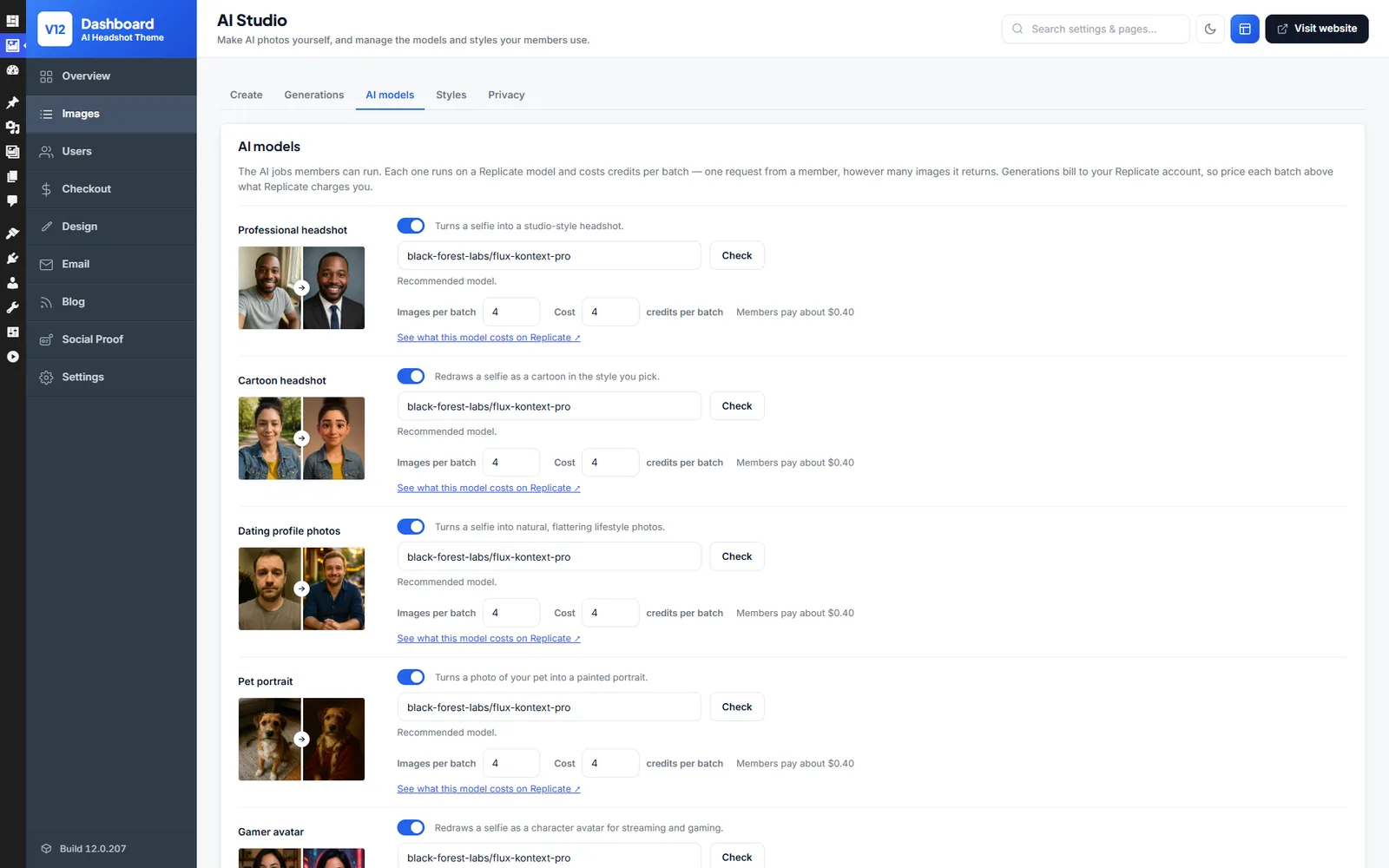
Switch each AI job on or off, change its Replicate model, and set how many images a batch makes and how many credits it costs.
Styles
Every style has a man and a woman example. Switch any style off, mark it Premium for members on a plan, or add your own.

Privacy Settings
Write the consent wording members agree to, and choose how many days uploaded photos are kept.

Design Your Studio Pages
Site Generator
With your own AI account connected, describe your AI photo site and the generator drafts every page. Ask it for a before-and-after row or a new hero, or arrange the blocks by hand.

Logo & Brand Colours
Put your site name, logo and colours on every page, checked in a live preview first.

Your AI Studio, Your Look
Make it feel like a premium photo studio or a fun cartoon shop, whichever suits your members.
Your Colours, Fonts & Logo
Set your brand colours and type, and the studio, pricing and member pages all match.
Works with Elementor
Designing in Elementor? Drag the 150+ studio blocks, like selfie rails, style chips and credit pack pricing, straight onto your Elementor pages.
Build Your Site Without Extra Plugins
Lay out your homepage, examples and pricing rows in the theme’s own editor, then go live.
Ready on Day One
Emails, translations, anti-spam and sign-in options for your members are already in place.
Automatic Emails
Members hear when their AI images are ready, get a receipt for every credit pack and a note when their plan changes.
Any Language
Run an AI photo site for members in another country with 13 ready-made languages, or add another.
Works on Any Screen
Selfies live on phones, so uploading, choosing styles and downloading all fit a small screen.
One-Click Demo Import
Load a ready-made AI studio with its pages, jobs, styles and credit packs, then add your Replicate key.
Unlimited Installs
Run separate AI photo sites, say one for headshots and one for pet portraits, on the same licence.
Video Tutorials
Watch how to connect Replicate, price your credits and build your pages in short video guides.
Social Proof
Small pop-ups show credit purchases, new images and how many people are browsing right now.
SMS Messages
Send members their security codes by SMS through Twilio, Vonage, MessageBird or Plivo.
Social Login
Members sign up in seconds with Google, Facebook, Twitter or Apple, ready to upload straight away.
Spam Protection
Bot accounts are kept out with reCAPTCHA and a ban on throwaway email addresses.
Built-In Blog
Write guides on what to wear for a headshot or how to take a good selfie, and bring in visitors from search.
Blocked Words
The video job's motion line is checked against a list of blocked words you can add to, before any credits are spent.
AI Headshot Theme vs the Alternatives
Building an AI photo product usually means months of custom work or renting a platform that charges for every image. This is a complete website for one price.
| AI Headshot Theme | Custom SaaS build | White-label AI platform | |
|---|---|---|---|
| Price | $79 one-time | Months of development | Monthly fees + usage markup |
| Complete website included | Yes | Built from scratch | Limited branding control |
| Unlimited installs | Yes | — | Per-site pricing |
| AI generation ready to go | Ready on your Replicate key | You integrate it | Locked to the vendor's models |
| Credits & memberships | Built in | Custom build | Varies |
| Ongoing platform fees | None | Hosting only | Monthly + per-generation |
| Works with Elementor (free) | Yes | — | No |
How to Build an AI Headshot Generator Website with WordPress
Six simple steps to your own AI headshot studio. Members upload their selfies, your site creates professional photos, and you charge for every batch. It all runs on WordPress, with no coding required.
- 1
Install the AI Headshot Theme
Upload the theme zip under Appearance → Themes → Add New and activate it. Any standard WordPress hosting can run the site, since the heavy AI work happens on Replicate's servers.
- 2
Enter Your Licence Key
Enter your licence key to switch on updates and support. One key covers every AI site you own.
- 3
Import the Demo AI Site
One click recreates the live AI demo with its generator pages, example galleries and pricing. You start from a working studio, not a blank site.
- 4
Connect the AI Models
Paste the Replicate API key from your own AI account into the admin area to switch on the headshot, photo-enhancement and video models. Then choose the styles and output quality your site offers.
- 5
Set Up Credits, Pricing and Payments
Price your credit packs and membership levels above your per-generation API cost and connect a payment gateway. Then decide what free accounts get, if anything.
- 6
Customise the Design with Elementor
Style the generator flow, galleries and landing pages with the 150+ Elementor blocks, then open your AI headshot studio to the public.
WordPress AI Headshot Theme FAQ
Common questions from people planning an AI headshot website.
Install the WordPress AI Headshot Theme, connect your Replicate API key and import the demo. Your visitors upload their selfies and pick a headshot style. The theme works with your own AI account, so the AI models on your Replicate key generate their professional photos while the credit and membership system charges them for every batch.
Yes. Those services run an upload-selfies, choose-a-style, download-your-headshots flow, and this theme ships that same flow ready to use on your own domain. You set the prices per generation instead of paying someone else's.
The theme works with your own AI account. Multiple AI models are wired in through the Replicate API service, and once you enter your API key they're live. A member uploads photos, the model renders the headshots, and the finished images land in their private members area. From there they can download them or publish them to your gallery.
Yes. The free Elementor plugin drives the page design. 150+ pre-built blocks, such as upload panels, before/after strips, style pickers and pricing tables, drop straight into your headshot pages.
Yes. The one-click import recreates the live AI demo on your domain, with the generator flow, example galleries and pricing pages in place. Swap in your branding and styles and the studio is yours.
No. Connecting the AI models means pasting the API key from your own AI account. Everything else is point-and-click in the admin area, including credit pricing, membership levels and moderating galleries. Video tutorials cover the setup end to end.
Yes, and that matters here, because most selfies live on phones. Members can upload photos, run generations and download their headshots entirely from a mobile browser.
Yes. One User License covers every site you own. Run a corporate-headshot studio and a photo-restoration or AI-video side project on the same key. Client builds need the Developer License instead.
No, and be careful with nulled copies of this theme in particular. Your site holds members' personal photos and payment activity, which is exactly what malware in a nulled zip goes after. The licensed theme is a one-time purchase with 6 months of updates and support and a 14-day money-back guarantee.
There's a 14-day money-back guarantee. Connect your Replicate key, run some test generations and try the credit checkout on your own hosting. If it's not the right fit, ask for a full refund within 14 days.
Regularly. AI model APIs move fast, and updates keep the Replicate integrations and WordPress compatibility current. 6 months of updates and support are included, with an optional $49-per-6-months extension after that.
The theme itself has none. There's no monthly fee and no per-site fee, and it pairs with free plugins like Elementor. The one running cost is the AI itself, because the theme works with your own AI account. Generations bill to your Replicate account per run, typically pennies per image, and that's the cost you price your credits above.
Related WordPress Themes
WordPress Video Theme
Create your own video sharing website similar to YouTube, Vimeo or Dailymotion.
WordPress Stock Photography Theme
Sell stock photos & videos similar to Shutterstock, iStock or Adobe Stock.
WordPress Dating Theme
Create online dating websites similar to Match.com, OkCupid or eHarmony.