All-in-One WordPress Theme
for Hotel Websites
Room pages, seasonal rates, a live availability calendar and online payment, so guests book with you instead of a travel platform and the commission stays in your pocket.


Popular Hotel Booking Features
A live room calendar, seasonal rates, deposits and guest emails all ship inside the Hotel Theme, with no booking plugin to add.
Live Room Calendar
Guests tap their arrival and departure on a calendar that shows only nights still free, and how many rooms are left.
Seasons That Repeat
Set summer, spring or Christmas prices with a minimum stay once, and they come round again every year.
A Clear Price Before Booking
Guests see every line of the price: nights, weekend supplement, extras and the deposit due now.
A Hotel Site
for Every Kind of Stay
From boutique hotels and B&Bs to hostels, cabins and holiday lets, each kind of stay has its own designs and sample rooms. Choose one and add your first room.
Hotels & Boutique Hotels
Rooms and suites in a townhouse or harbour hotel, booked direct.

B&Bs & Guest Houses
A handful of rooms, breakfast and house rules on one friendly site.

Serviced Apartments
Nightly or weekly stays with a kitchen, a minimum stay and a deposit.

Hostels & Lodges
Dorm beds sold one by one beside private rooms.

Glamping & Cabins
Bell tents, huts and treehouses with their own seasons.

Holiday Lets
Villas and cottages let by the week, with a Saturday changeover.

Spa & Retreat Stays
Sell the room and the extras together, from breakfast to late check-out.

Direct Booking
Win back the share the travel platforms take on every stay.

Choose Your Hotel Design
Every design is ready to take bookings: swap in your own rooms, photos and colours.


Earn More From Every Stay
Take deposits, sell extras and fill the quiet weeks, and every payment goes straight to you.
Deposit Now, the Rest Later
Guests pay a deposit or the whole stay when they book, at the percentage you set. The rest is paid online from their booking page or at the desk.
Extras Guests Can Add
Offer breakfast, late check-out or parking, priced per stay, per night or per guest per night, added to the total as the guest ticks them.
146 Payment Gateways
Guests pay through PayPal, Stripe or any of 144 other gateways, straight into your own account.

No Commission, Ever
Guests book on your own site, so there is no share taken off each stay, and every payment comes with its own invoice.
Reward Longer Stays
Give a percentage off stays of a week or more, or set a weekly price, and add a supplement on Friday and Saturday nights.
Group and Event Inquiries
Weddings, walking groups and work trips send an inquiry from any room page, with dates, group size and occasion, and you reply by email.
Sell Dorm Beds One by One
A shared dorm can be sold per bed, so a party of four books four beds and the rest stay on sale.
Easy to Find, Easy to Book
Guests should see which rooms are free on their dates, and everything they need before they book.
Search by Dates and Guests
Guests enter their check-in, check-out and party size, and only the rooms still free on those nights are shown.
Room Pages That Take Bookings
Every room gets its own page with photos, beds, size and amenities, and the booking box beside them with the price for the chosen nights.
Four Gallery Layouts
Show each room’s photos as a large photo with thumbnails, a grid, a carousel or tall photos stacked down the page.
Rooms Search Engines Understand
Each room page carries hotel room structured data: how many it sleeps, its beds, amenities and price, linked to your hotel.

Finding us: two minutes from the harbour car park. Ring the bell if you arrive after 10pm.
Every Guest Gets Their Own Booking Page
A private link, no password. Every email you send carries it, so guests can check their room, dates and price at any time.
Pay the rest online. Guests who paid a deposit settle the balance from the same page, and find your check-in times and directions there too.
Ask for new dates. A guest can ask to move their stay, and you approve or decline it from Reservations.
A Dashboard for Guests and Your Front Desk
Upcoming stays, balances and invoices for guests, and today's arrivals, departures and requests for you.
For Guests

For You and Your Front Desk

What Guests Get
Guests book, pay and manage their stay without ever seeing WordPress, and without needing an account to do it.
A Page for Every Booking
Each stay has its own private page, no password needed: the room, dates, what is paid and what is left, and how to find you.
Ask for New Dates
Guests ask to move their stay from their booking page. The new price is worked out, and nothing changes until you approve it.
Invoices & Receipts
Guests with an account keep every deposit and balance there, each with its own invoice to download.
Favourite Rooms
Guests save the rooms they like and find them again in their account.
Two-Factor Login
A sign-in code protects guest and staff accounts, and staff can be made to use one.
Account & Privacy
Members pick which emails they get, see new sign-ins and can close their account, held for 30 days first.
Every Room, Guest and Payment in One Admin
Confirm new bookings, see who is arriving and keep the hotel running from one dashboard.
Try the admin demoOne Dashboard
Track new rooms, new members, comments and revenue over the last month, with anything waiting for review and each room's status at the side.

Every Reservation in One List
Every stay across every room, with what is paid and what is owed. Confirm, decline, change dates, record the balance paid at the desk, and see the month's occupancy below.

Manage Every Room
All your rooms side by side with their photos, status, views and how complete each page is, filtered in a click.

Hotel Settings, Set Once
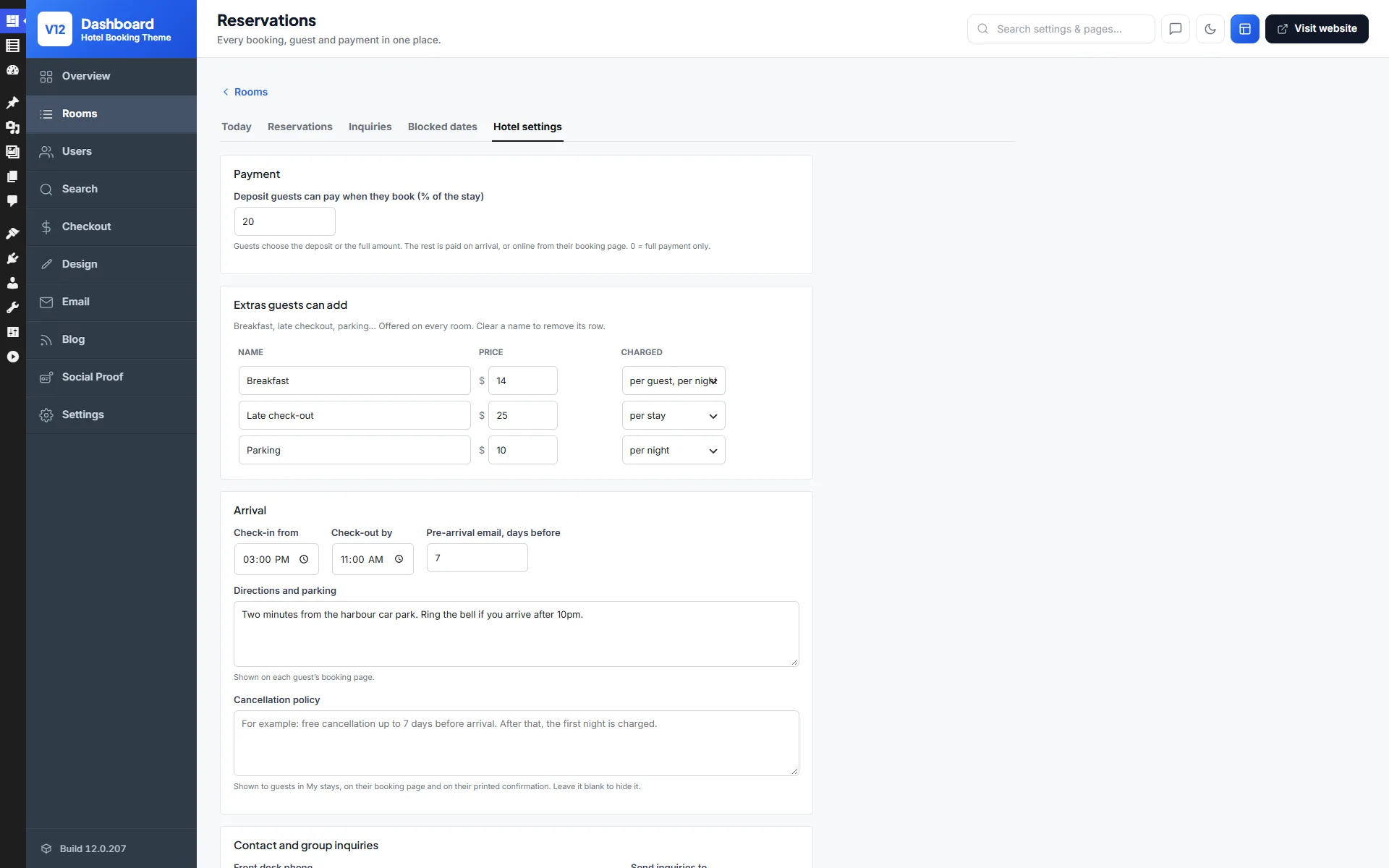
The deposit guests pay, the extras they can add, check-in and check-out times, directions, the pre-arrival email and your cancellation policy.
Design Your Hotel Pages
Site Generator
With your own AI account connected, describe your hotel and the generator drafts every page. Ask it for a row of rooms or a new date search, or arrange the blocks by hand.

Logo & Brand Colours
Put your hotel's name, logo and colours on every page, checked in a live preview first.

Your Hotel, Your Look
Make it feel like a harbour inn, a townhouse hotel or a mountain lodge, whichever suits your guests.
Your Colours, Fonts & Logo
Set your brand colours and type, and room pages, search results and the booking page all match.
Works with Elementor
Designing in Elementor? Drag the theme’s hotel blocks, like the date search, room cards and guest reviews, straight onto your Elementor pages.
Build Your Site Without Extra Plugins
Lay out your homepage, room pages and search in the theme’s own editor, then go live.
Ready on Day One
Guest emails, translations, anti-spam and sign-in options are already in place.
Automatic Emails
You hear about new reservations, date requests and inquiries, and guests get their confirmation, a pre-arrival note and arrival-day directions.
Any Language
Take bookings from overseas guests with 13 ready-made translations, from German to Japanese, or add another.
Works on Any Screen
Most travellers search on their phone, so the calendar, room pages and payment are sized to fit.
One-Click Demo Import
Load a ready-made hotel site with sample rooms, prices and sleeps, then swap in your own.
Unlimited Installs
Run a site for each property you own, say a town hotel and a country B&B, on the same licence.
Video Tutorials
Watch how to set up rooms, rates and payments in short video guides.
Social Proof
Small pop-ups show new bookings and how many people are looking at rooms right now.
SMS Messages
Send members their security codes by SMS through Twilio, Vonage, MessageBird or Plivo.
Social Login
Guests who want an account sign up in seconds with Google, Facebook, Twitter or Apple.
Spam Protection
Bot accounts are kept out with reCAPTCHA and a ban on throwaway email addresses.
Built-In Blog
Write about your area, walks and events to bring in visitors from search engines.
Reviews From Real Stays
Only guests who have stayed can review a room, from their booking page, marked Verified stay, and you can reply in public.
Your Own Site vs the Alternatives
The two usual ways to take hotel bookings: list on a travel platform and pay a cut of every stay, or add a booking plugin to a generic theme and renew it every year.
| Hotel Theme | Travel platform | Theme + booking plugin | |
|---|---|---|---|
| Price | $99 one-time | Free to list | $59–$249 / yr |
| Commission per booking | 0% | Taken on every stay | None |
| Monthly fees | None | Varies | Renewals |
| Guest relationship | Yours | Platform's | Yours |
| Unlimited installs | Yes | N/A | 1 site |
| AI site builder | Yes | — | — |
| You own the site | Yes | Listing only | Yes |
| Works with Elementor (free) | Yes | N/A | Varies |
WordPress Hotel Theme FAQ
Common questions from hotels, B&Bs and guest houses planning a booking website.
It's designed for a single property to start with. If you run multiple properties, join the list and tell us — it helps us prioritise multi-property support.
Yes. Guests can pay in full or leave a deposit securely at the time of booking, right on your own website.
No. Bookings come directly through your site, so you keep the revenue the online travel agencies would otherwise take as commission.
Yes. The live demo includes all 24 designs, and you can look around as a guest or sign in as the hotel owner to see the admin area, with no signup needed.
Related WordPress Themes
WordPress Directory Theme
Create your own business directory website similar to Yelp, Yellow Pages or Foursquare.
WordPress Real Estate Theme
Create your own real estate website similar to Rightmove, Zillow or Redfin.
WordPress Classifieds Theme
Create your own classifieds website similar to GumTree or Craigslist.