 Listeo


Search filters
Switch each filter on or off and drag them into the order visitors see on the search page.
1Location
2Category
3Nearby
4Price range
5Minimum rating

A multilingual WordPress directory theme with everything built in, so you don't need a pile of third-party plugins. Pick a template, import the demo listings and categories, and you start from a working directory, not a blank site.
Users register, create listings and upload images and video from the frontend, managing everything themselves.
You set up membership plans, subscriptions and advertising from the admin, and you get paid when users upgrade.
Let visitors quickly find listings using keywords, categories, locations, prices, ratings and custom filters.
Using MyListing, ListingPro, Listeo, Listivo or Listify? Switch to the Directory Theme and your listings, photos, owners and reviews come across with one click. There is no exporting and no re-uploading. Coming from somewhere else? Import your listings from a spreadsheet.
Businesses and users can easily create, edit and manage their own listings from the frontend.
Elementor-friendly: Easily customize and design your pages using the free Elementor plugin.
Every part of a directory page is a block. Search bars, category grids, listing carousels and map sections all drag into place, so you build new pages without code.
View Live DemoPick from 200+ directory-specific Elementor blocks, such as hero searches, listing grids and review strips, and drop them straight into your pages.
Explore Our ThemesGoogle Maps or OpenStreetMap, location search, nearby listings and map-based browsing. Local directories need all of it.
Let customers leave reviews, ratings and feedback to build trust and help users compare listings.
Paid listings, featured listings, membership packages, subscriptions, claim-your-business fees and other revenue options.
Flexible categories, subcategories, tags and custom listing fields make the theme suitable for almost any directory niche.
A simple submission form so users can add listings without ever touching the WordPress admin area.
Business owners can claim existing listings and verify ownership, helping keep directory information accurate.
Directory users search on the move, so listings, maps, filters and submission forms all work perfectly on mobile.
Every business owner gets their own login to manage listings, track views and leads, message customers and pay invoices.
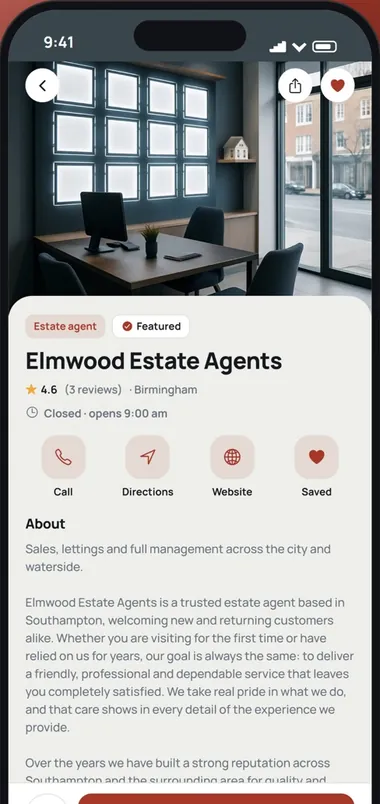
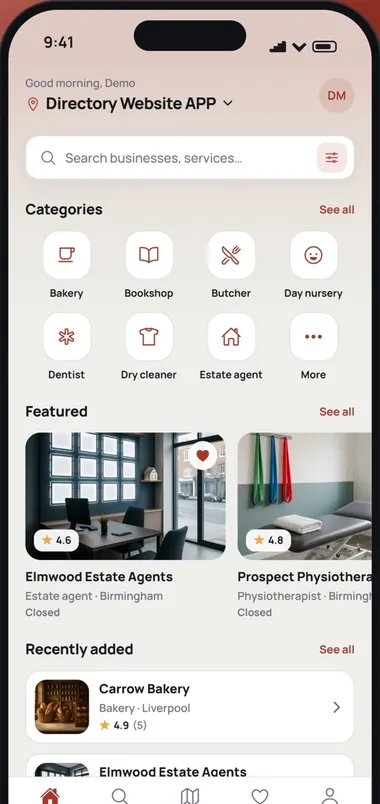
Download our Directory app free and try it on your phone. It runs on a Directory Theme site, with the same listings, search, maps, reviews and messages.
Choose a starting point for your directory business. Make it yours in minutes.
A guide to the shops, trades, clinics and kitchens in one town or city, searched by postcode and reviewed by local people.

Results list with a map beside it.

Practitioners with an appointment form.

Rated local pros and quote requests.

Agencies, consultants, accountants and advisers, ranked by the businesses that hired them.

Salons, barbers and spas, searched by treatment and area.

Personal trainers, sport, speaking and life coaches.

Dealers, garages and MOT centres.

Where to eat, drink and stay, by area.

How to plan, build and grow a directory website that earns money from the businesses listed on it. 40 pages, from choosing a niche to your first 90 days.
Listing approval, search filters, custom fields and member checks are all set from one dashboard instead of a stack of directory plugins.
Open the admin demoSwitch each filter on or off and drag them into the order visitors see on the search page.
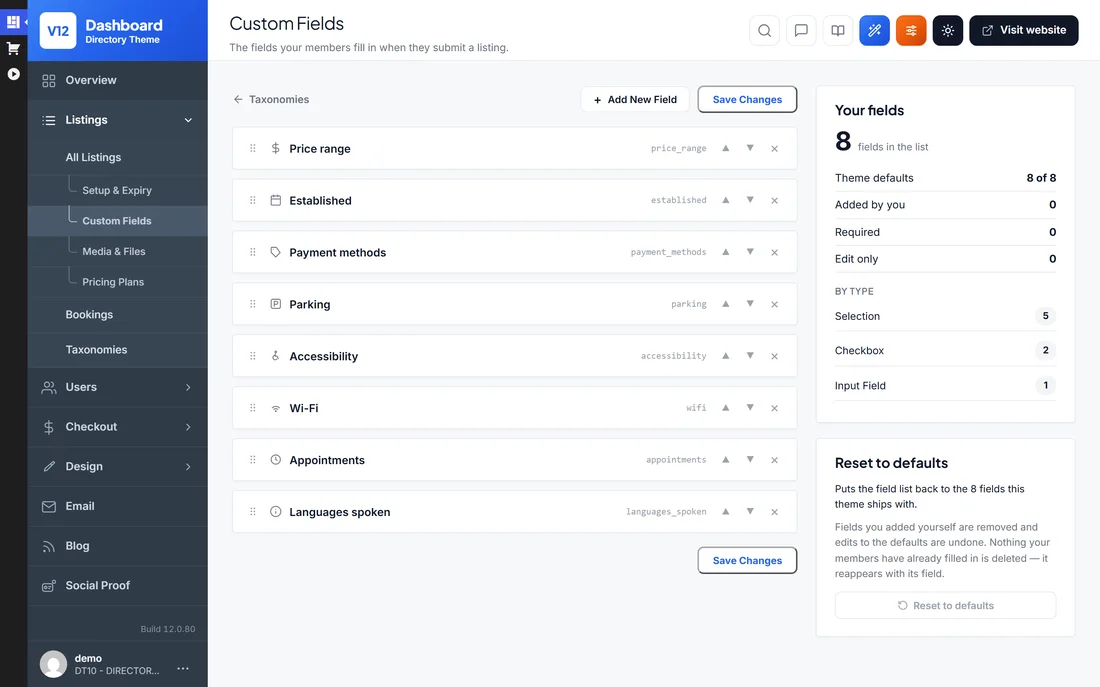
Add the details your niche needs, like parking, accessibility, Wi-Fi or languages spoken.
New listings, members and reviews over 7, 30 or 90 days, a to-do list of listings waiting for approval, and every other screen one click away.


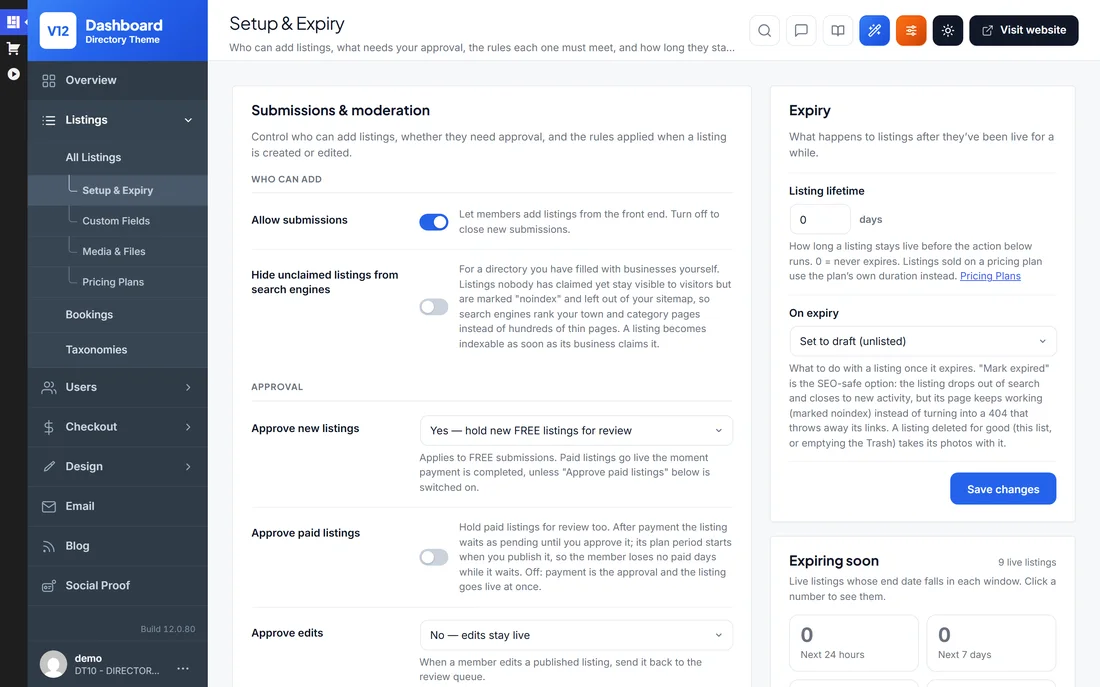

Hold new free listings for review, and choose what happens to a listing when its time runs out.
Ask members to confirm their email or phone before they can post, or upload a photo ID for a Verified badge.
Members confirm their email address by clicking a link we send them.
Members confirm their phone number with a 6-digit code.
Approved members get a Verified badge.
Connect your own AI account, describe your directory, and the generator lays out the pages. Ask for changes in plain English or move the blocks yourself.

Every email the site sends is ready to go. Edit the wording of any of them, or switch one off.
Pop-ups and bars that show visitors what is happening on your directory: new listings, reviews, sign-ups and how many people are browsing right now.
Text members through Twilio, Vonage, MessageBird or Plivo, and take payments through PayPal, Stripe and 140 more gateway plugins.
These are the plugins most directory sites end up installing. With the Directory theme they are already there, switched on from the admin area.
Restyle listing pages, headers and landing pages in the free Elementor page builder.
Search heroes, listing grids, category strips and map sections.
English plus 10 language packs. Every label can be translated.
PayPal, Stripe and 144 more free gateway plugins for your own merchant account.
Members confirm their email or phone before they can post.
Location, nearby, category, price and rating filters, in your order.
Sell listing plans, member subscriptions and banner ad space.
Members log in to add, edit and renew their own listings.
Visitors rate and review businesses. You approve and reply.
A one-time theme that does what a stack of plugins or a rented SaaS charges you monthly for.
| Directory Theme | ListingPro | Listeo | MyListing | Directory plugins | |
|---|---|---|---|---|---|
| Price (year 1) | $99 one-time | $69 | $119 | $119 | Free core + $49–$153 / yr add-ons |
| Sites per licence | Unlimited (sites you own) | 1 site | 1 site | 1 site | 1 site to unlimited, by plan |
| Renewal | None | Optional support renewal | Optional support renewal | Optional support renewal | Every year |
| Paid listings built in | Yes | Yes | Via WooCommerce | Via WooCommerce | Paid add-on |
| Claim-a-listing built in | Yes | Yes | Via WooCommerce | Via WooCommerce | Paid add-on |
| Payment gateways built in | 30+ incl. PayPal & Stripe | Stripe, PayPal, 2Checkout, bank | WooCommerce required | WooCommerce required | GetPaid or WooCommerce |
| Extra plugins required | None | None for payments | WooCommerce | WooCommerce + Subscriptions | 2–3 add-ons + payments plugin |
| AI site builder | Yes | — | AI search & summaries | — | — |
| Booking engine | — | — | Built in | — | Add-on |
| 100% open source (GPL) | Yes | Proprietary | Proprietary | Proprietary | Core is GPL |
Competitor prices and features checked on 10 September 2026 against each vendor's own page. ListingPro, Listeo and MyListing are ThemeForest Regular licences. “Directory plugins” covers GeoDirectory and Directorist, whose free cores need paid add-ons to charge for listings.
Six simple steps to your own business directory website. Local businesses pay to be listed, visitors search your site to find them, and you earn from every paid listing. It all runs on WordPress, with no coding required.
Add the Directory Theme under Appearance → Themes and activate it. The ads engine, radius search and custom fields are all inside the theme.
Pop in your licence key to switch on updates and support. One key covers every directory site you own.
One click imports the demo directory with sample business listings, categories and map-search pages. You customise a working directory instead of building from blank.
Set up your directory categories and add listings, or let businesses submit their own.
Turn on paid and featured listings, reviews and map/zipcode search, and set your pricing.
Restyle headers, listing pages and layouts with the 200+ Elementor directory blocks. Then put your business directory live.
Our guides name the competing themes and plugins, with prices and figures checked on the vendors' own pages, so you can decide with the facts in front of you.
The questions we hear most before people buy. Still unsure? Our support team is happy to help.
Install the WordPress Directory Theme on any WordPress site, import the demo directory and add your categories and listings. Or let businesses submit their own. Map search, reviews and paid listings are built in, so there's nothing extra to wire together and no coding involved.
Yes. That's exactly what the theme is built for. You get Yelp-style listing pages with photos, opening hours, Google Maps, customer reviews and star ratings, plus zip/postcode radius search so visitors can find businesses near them.
Yes. Paid listings, claim-a-listing and PayPal/Stripe payments are built into the theme, so no extra directory plugins are needed. Businesses register, create and manage their own listings from the front end. You decide what's free and what's paid, and featured placement, homepage spots and sponsored ads can all be charged for. Owners can also claim listings you've pre-added, which is a great way to seed a new directory.
Yes. Every directory page can be edited in the free Elementor plugin. The theme ships with 200+ directory blocks, such as hero search bars, listing grids, category strips and map sections, and you drag them into place.
Yes. The one-click import recreates the live directory demo on your own domain, with sample listings, categories and search pages included. You replace the placeholder businesses with real ones instead of starting empty.
No. Approving listings, setting listing prices, moderating reviews and changing the design all happen in the admin area or the free Elementor editor. Video tutorials walk through the directory setup step by step.
Yes. Listing pages, map and radius search and the business submission forms all adapt to small screens. Visitors can browse the directory, and owners can manage their listings, from any phone or tablet.
Yes. A User License covers unlimited directory websites that you own. Run a city directory, a trades directory and a niche directory side by side on one licence. If you build directories for clients, choose the Developer License instead.
Yes. If your site runs MyListing, ListingPro, Listeo, Listivo or Listify, activate the Directory theme on the same website and use Settings › Migrate to convert every listing, photo, owner and review in place. Any other site can be imported from a CSV file.
No, and nulled copies of the Directory Theme are worth avoiding. They're outdated and often bundle malware, which is a real risk on a site that stores business details and takes listing payments. The licensed theme is a one-time purchase with 6 months of updates and support and a 14-day money-back guarantee.
There's a 14-day money-back guarantee. Import the demo directory, load some listings and test the paid-submission flow on your own hosting. If the theme doesn't fit, contact us within 14 days for a full refund.
The Directory Theme is updated regularly for WordPress compatibility and new features, and every purchase includes 6 months of updates and support. Extending after that is optional at $49 per 6 months. Your directory keeps working either way.
No. Everything a directory needs is in the theme, from listings and paid submissions to maps, reviews and search. It works with free plugins such as Elementor. Beyond your hosting and domain, the only optional cost is extending updates and support after the first 6 months, at $49 per 6 months.
“I hired a few developers to work on a normal WordPress theme but it cost me an arm and a leg! Working with this theme was much easier and faster. You can easily change the design as you prefer, save lots of time to communicate on color, small changes, etc. Thanks guys.”

Gary
“Thanks for everything Mark, Iv had a directorypress theme since version 7 and the updates just keep getting better.”
Mateus Graz
“well built themes, they load fast, code is clean and optimised for seo”
Alistair Kelsall
“Honestly, your themes are great! Thank you.”

Temmy Flavianus
“I have been using Directory Press since 2012, good value for money and I always look forward to the next updates.”

Alan Johnston
“I love this directory, it makes it very easy to add listings with a couple of clicks. I love the customer service they make many things work like a charm. Great value for the money”
Horacio Ramos
Create your own classifieds website similar to GumTree or Craigslist.
Create your own real estate website similar to Rightmove, Zillow or Redfin.
Create your own job board website similar to Indeed, CareerBuilder or ZipRecruiter.
Coming soon:WordPress Wedding Directory Theme →
One-time $99 · unlimited installs · 30+ templates · AI builder · 14-day money-back guarantee.