Fashion & beauty
Clothing, skincare and beauty stores that pay members back on every order.
- Rates as a percentage or a fixed amount
- Voucher codes alongside the cashback
- Members claim cashback on an order

A multilingual WordPress cashback theme with store pages, cashback offers, member accounts and payout management built in, so there is no cashback plugin or add-on stack. Pick a design, import the demo stores and offers, and the rewards site is working the first time you log in.
Members shop through your affiliate links and merchants pay you commission on every purchase. Share part back as cashback and keep the margin.
Add seller memberships, featured store placements and advertising on top. No platform takes a cut of any of it.
List the merchants your members can earn from, each with its own store page, live offers and cashback rate. You set a different rate per store and change it anytime.
Every store and offer links out through your own affiliate links, automatically cloaked and click-tracked. The commission those clicks earn is the money your site runs on.
Members see their pending and confirmed cashback in their own wallet, submit order IDs for claims, and request payouts. You confirm against your network reports and pay from the admin.
Elementor-friendly: Easily customize and design your cashback pages using the free Elementor plugin.
Cashback pages are built from blocks such as store grids, offer rails and payout tables. Drag the ones you need straight onto the page.
View Live DemoBuild a converting cashback website faster with our Elementor block system. Pick, drag and drop pre-designed blocks into place.
Explore Our ThemesList the voucher codes that work alongside each store's cashback, with what each one gives, its expiry date and its small print. Members copy a code and go through your tracked link, so the sale still earns their cashback.
Add every saving up for the member on one basket. That means a loyalty scheme's member price, the best voucher code, your cashback, and the cashback their reward credit or debit card pays on top. Members tick the schemes and cards they hold; visitors see the best case.
Sell membership plans on top of your affiliate margin, such as boosted cashback rates or early deal access for paying members, with pricing tables built into the theme.
Charge merchants for homepage banners, featured store slots and category top placements. Multiple ad layouts are included and picked from the admin area.
Full AJAX search across stores, offers and categories with your own filters, so members find the highest rate for the thing they're about to buy in seconds.
Every member gets their own login with claims, favourite stores and payout history, with email or SMS verification before new accounts can use cashback features.
Describe your cashback niche and let AI set up the site for you, with pages, categories, demo stores and a design to match, all editable afterwards.
Stripe, PayPal, Apple Pay and dozens of regional options for collecting membership fees, free to download and connect. Member payouts are approved and tracked in the admin, and you pay them by PayPal or bank transfer.
A clean admin for everything. Stores, offers and members sit on one side, with clicks, commission and payout queues on the other. That is 300+ options, all in one place.
Most deal-hunting happens on a phone, so store pages, offer lists, click-outs and the cashback wallet are all built to work perfectly on any screen size.
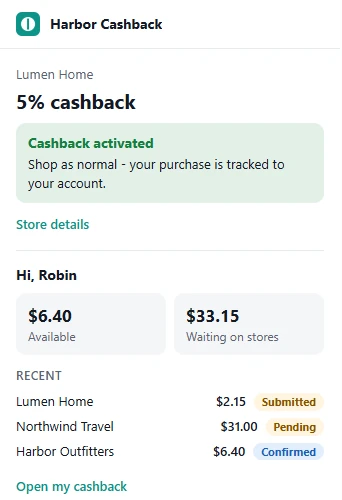
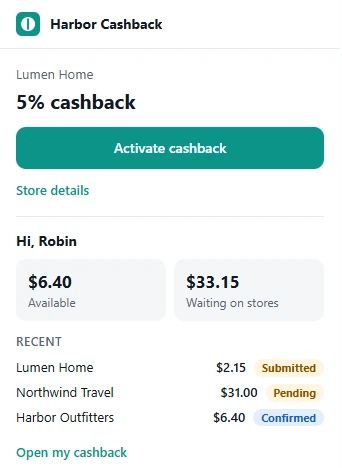
Give your members a Chrome and Edge extension under your brand. It shows your cashback rate whenever they're on one of your stores, and activates cashback in one click.
One file for both.
Chrome Web Store $5 one-time fee · Edge free
The theme comes with 21 cashback website templates for seven kinds of shopping. Pick the one closest to yours, add your stores and affiliate links, and keep your share of every commission.
Clothing, skincare and beauty stores that pay members back on every order.
Food, toys, insurance and the vet.
Furniture, kitchens, bedding and the garden.
Laptops, phones, audio and desk kit.
Hotels, airlines, car hire and cruises, paid once members are home.
Hosts, domains and VPNs that pay on the first invoice and on renewals.
How to plan, build and grow a cashback website that pays members back, and pays you too. 35 pages, from choosing a niche to your first 90 days.
Stores, cashback rates, member claims and payouts are all set from one dashboard instead of a stack of cashback plugins.
Open the admin demoSwitch each filter on or off and drag them into the order members see on the search page.
Each store has its own cashback rate, rate type, claim window and affiliate network.
New stores, members, comments and revenue over 7, 30 or 90 days, a to-do list of orders waiting to be processed, and every other screen one click away.


Hold new free stores for review, and choose what happens to a store when its time runs out.
Ask members to confirm their email or phone before their account opens, or upload a photo ID for a Verified badge.
Members confirm their email address by clicking a link we send them.
Members confirm their phone number with a 6-digit code.
Approved members get a Verified badge.
Connect your own AI account, describe your cashback site, and the generator lays out the pages. Ask for changes in plain English or move the blocks yourself.

Every email the site sends is ready to go. Edit the wording of any of them, or switch one off.
Pop-ups and bars that show visitors what is happening on your site, such as sign-ups, reviews and how many people are browsing right now.
Text members, let them sign in with the accounts they already have, and see where your clicks come from.
Text alerts through Twilio, Vonage, MessageBird or Plivo, on your own account.
Sign in with Google, Facebook and other providers.
Google Analytics and Matomo tracking on every page.
Short web addresses of your own that point at pages on your site.
These are the plugins most cashback sites end up installing. With the Cashback theme they are already there, switched on from the admin area.
Restyle store pages, headers and landing pages in the free Elementor page builder.
Store grids, offer rails, category rows and search heroes.
English plus 10 language packs. Every label can be translated.
Members sign in with Google, Facebook and other providers instead of a new password.
Members claim cashback on an order. Match claims to your Awin, CJ, Impact or Rakuten report.
Category, minimum cashback, cashback type and rating filters, in your order.
Members see their cashback balance and ask to be paid once it reaches your minimum.
Add a welcome bonus or an invite reward to a member's balance.
Members rate and review stores. You approve and reply.
A one-time theme that does what a hosted cashback platform, or an affiliate theme plus a stack of paid plugins, charges you monthly for, without touching your commission.
| Cashback Theme | Hosted cashback platform | Theme + plugin stack | |
|---|---|---|---|
| Price | $99 one-time | $49–$299 / mo | $60 + paid add-ons |
| Affiliate commission | Stays yours | Platform takes a cut | Varies |
| Unlimited installs | Yes | — | 1 site |
| Stores, offers & payouts built in | Yes | Yes | Add-ons |
| AI site builder | Yes | — | — |
| Monthly fees | None | Required | Add-ons |
| You own the platform | Yes | Hosted / rented | Yes |
Six simple steps to your own cashback website. You earn a cut every time a member shops through your site, and you decide how much to give back. It all runs on WordPress, with no coding required.
Upload the WordPress Cashback Theme to any WordPress site under Appearance → Themes → Add New → Upload Theme, then activate it.
Enter your licence key in the admin area to switch on updates and support. One licence covers unlimited installs on sites you own.
Run the one-click demo import so your site instantly looks like our live demo, ready to customise.
Add the stores your members can earn cashback from, with your affiliate links attached, each store's cashback rate and any voucher codes that work alongside it.
Link your affiliate networks, set the cashback rate per store and configure how members request payouts.
Use the 250+ Elementor design blocks to style your headers, pages and layout, then launch your cashback website.
The questions we hear most before people buy. Still unsure? Our support team is happy to help.
Install the WordPress Cashback Theme, import the demo and add the stores and offers your members can earn from, with your affiliate links attached. Member balances, claims and withdrawals are all handled inside the theme. There's nothing to code.
Yes. The theme is built for exactly that model. You list stores and cashback offers, members click through your affiliate links to shop, and you share part of your affiliate commission back with them as cashback. Store pages, member accounts and payout management are all built in.
Members click through your cloaked affiliate links and submit their order IDs. You confirm each purchase against your affiliate-network reports and pay out the cashback from the admin area. Connect a network's postback, or upload its sales report, and matching purchases appear in members' accounts automatically. You stay in control of every approval and payout.
Yes. Each store page lists the voucher codes that work alongside its cashback. A 'your total saving' box adds up a loyalty scheme's member price, the best code, your cashback and the cashback a reward credit or debit card pays, on whatever the member plans to spend. You keep the catalogue of loyalty schemes and reward cards in the admin area. Members tick the ones they hold and see their own figure, while visitors see the best case. Only codes listed on your site are counted, and store pages warn that a code from elsewhere can void the cashback.
Yes. Store grids, offer lists and hero banners are all Elementor blocks, and there are 250+ of them. You restyle the whole cashback site visually in the free plugin without touching theme files.
Yes. One-click demo content sets up your site to look like our live demo, with sample stores, offers and category pages included. You get a ready-made cashback website that you then fill with your own merchants and branding.
No. Adding stores and offers, setting cashback rates, confirming member claims and paying out all happen in the admin area, and the design is edited with the free Elementor page builder. Step-by-step video tutorials and documentation are included.
Yes. The theme is 100% responsive. Store pages, offer listings and the members' cashback area all work well on desktops, tablets and phones, where most deal-hunting happens.
Yes. A User License includes unlimited installations on cashback websites that you own, with no per-site fees. Run a general cashback site and a niche one side by side. If you build sites for clients or paid projects, a Developer License covers commercial and client work.
No. A cashback site is exactly where a nulled theme hurts most, because it holds member balances and payout details. Pirated copies are a known malware vector that never sees an update. The licensed theme is one payment, with 6 months of support and a 14-day guarantee.
Every purchase has a 14-day money-back guarantee. Import the demo, add a few stores and test the member cashback flow on your own hosting. If the WordPress Cashback Theme isn't right for you, contact us within 14 days for a full refund.
Every WordPress Cashback Theme purchase includes 6 months of free updates and support, keeping the theme compatible with the latest version of WordPress. After that you can optionally extend updates and support for $49 per 6 months.
No. There are no hidden costs or forced premium plugins, and the cashback theme works with free plugins such as Elementor. Everything you need to run a cashback website is included. The only optional extra is extended updates and support after the first 6 months, at $49 per 6 months if you want it.
Create your own coupon website similar to Coupons.com, RetailMeNot or Rakuten.
Create your own price comparison website similar to Shopzilla, BizRate or PriceGrabber.
Create your own classifieds website similar to GumTree, Craigslist or Backpage.
One-time $99 · unlimited installs · stores, offers & payouts built in · AI builder · 14-day money-back guarantee.


