All-in-One WordPress Theme
for Business Directories
Create your own Yelp-style website with paid listings, built-in reviews, location maps, and AI site building with your own AI account.


Popular Directory Website Features
All built into the Directory Theme, with no extra plugins to buy.
Transfer Tool
Moving from MyListing, ListingPro, Listeo, Listivo or Listify? Your listings, photos, owners and reviews come across in one click. Or import from a spreadsheet.
Bookings & Appointments
Visitors book appointments and reservations straight from a listing. Owners approve requests and can take a deposit or full payment.
Subscription Listing Plans
Sell listing plans that renew automatically, so businesses keep paying while their listing stays live.
A Directory for
Everything
Nine kinds of directory, each with its own designs, categories, pictures and demo listings. Pick yours and add your businesses.
Local Business Guides
Build a guide to every shop and business in your town.

Restaurants & Takeaways
List local restaurants and takeaways, with menus and opening times.

Health & Clinics
Help people find clinics, dentists and therapists near them.

Trades & Home Services
Connect homeowners with trusted plumbers, builders and cleaners.

Professional Services
List local lawyers, accountants and consultants so clients can find them.

Beauty & Wellness
Let people find salons, spas and beauty experts nearby.

Coaches & Tutors
Put tutors, trainers and coaches in one place, so parents and learners can compare.

Automotive
List garages, car dealers and mechanics in your area.

City Guides
Share the best places to eat, stay and visit in your city.

Pick a Design to Start From
Change the words, pictures and colours of any design to suit your business.


The Directory Playbook
How to plan, build and grow a directory website that earns money from the businesses listed on it. 40 pages, from choosing a niche to your first 90 days.
Make Money From Your Directory
Charge businesses to list, to stand out and to hear from customers. Every way to earn is already in the theme.
Paid Listings & Plans
Sell listing plans with their own price, length and limits. Plans can renew automatically, so businesses keep paying while their listing stays live.
Claim Your Business
Fill the directory yourself, then let owners claim their listing. You check each claim, and once you approve it the listing moves to their account.

Pay Per Lead
Visitors send an enquiry from any listing. The business sees a locked lead and spends credits to open the name and contact details.
Featured & Homepage Upgrades
Sell extras on top of any plan: a featured badge, a place at the top of search and a spot on the homepage. Each upgrade runs for as long as you choose.
146 Payment Gateways
Take payments with PayPal, Stripe and 144 more, straight into your own merchant account.
Banner Ad Space
Sell banner and text adverts in set places around the site. Members buy them from their account, and every advert counts its own views and clicks.
Easy Search, Clear Listing Pages
Visitors judge a directory on two things: how quickly they find a business, and what they see when they open it.
Search & Maps
Visitors search by place or keyword, narrow it down with filters and see the results on a map.
Modern Listing Pages
Every listing gets its own page with photos, details, a map and contact buttons. You choose what shows and in what order.
Custom Search Filters
Add location search, category filters, price ranges and custom fields, so visitors find the right business in a few clicks.
Custom Listing Fields
Ask businesses for the details your visitors care about. Add text boxes, drop-downs, tick boxes, files and more to suit your kind of directory.
Location & Maps
Google Maps, Mapbox or OpenStreetMap. Visitors search near them, see what’s close by and browse every listing on the map.
OpenStreetMap works out of the box, with no Google API key needed.
A Dashboard for Everyone Who Uses Your Site
Customers and business owners each get their own dashboard, with only what each of them needs.
For Your Visitors

For the Businesses Listed

What Members Get in Their Account
Everything happens on the front of the site, in the member’s own account. You decide which checks and tools are switched on.
Verification tools
Choose how members prove who they are: email or SMS codes, photo ID, a live camera selfie, an automatic ID check, a card check, documents or your own approval.
Two-factor login
Members can add a 6-digit code at sign-in, and staff accounts can be made to use it.
Messages & files
Members message each other inside the site and send files like menus, quotes and price lists.
Saved listings & searches
Customers save their favourite places and searches, and can get an email when new ones match.
Invoices & billing
Every plan, upgrade and payment is listed in the account, with an invoice ready to download.
Account & privacy
Members edit their details, get sign-in alerts and can delete their account themselves, with a 30-day hold.
One Admin Area Runs Your Entire Directory
See what’s new, approve listings, check members and design your pages, all from one place.
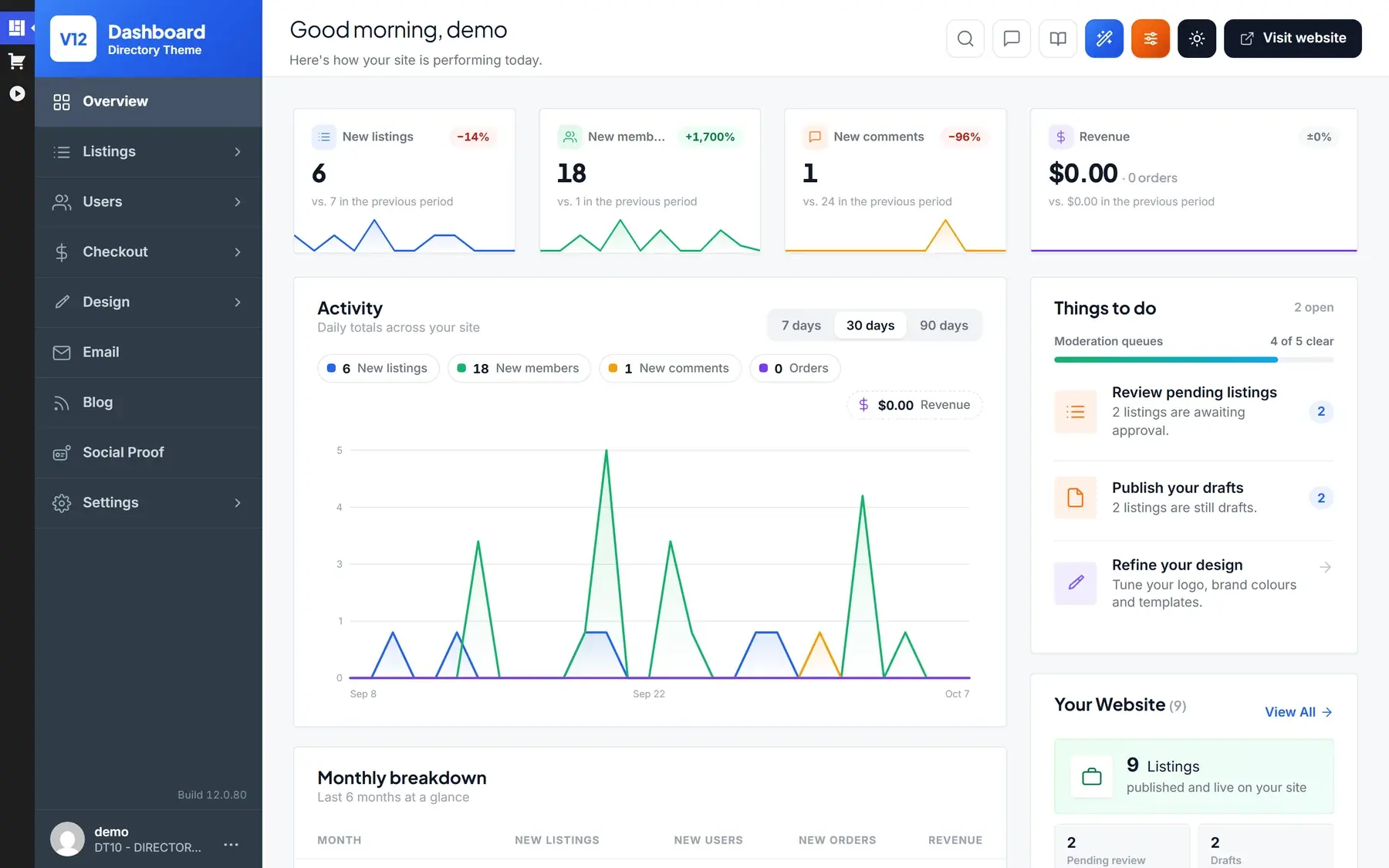
Try the admin demoOne Dashboard
New listings, members and reviews over 7, 30 or 90 days, a to-do list of everything waiting for you, and every other screen one click away.
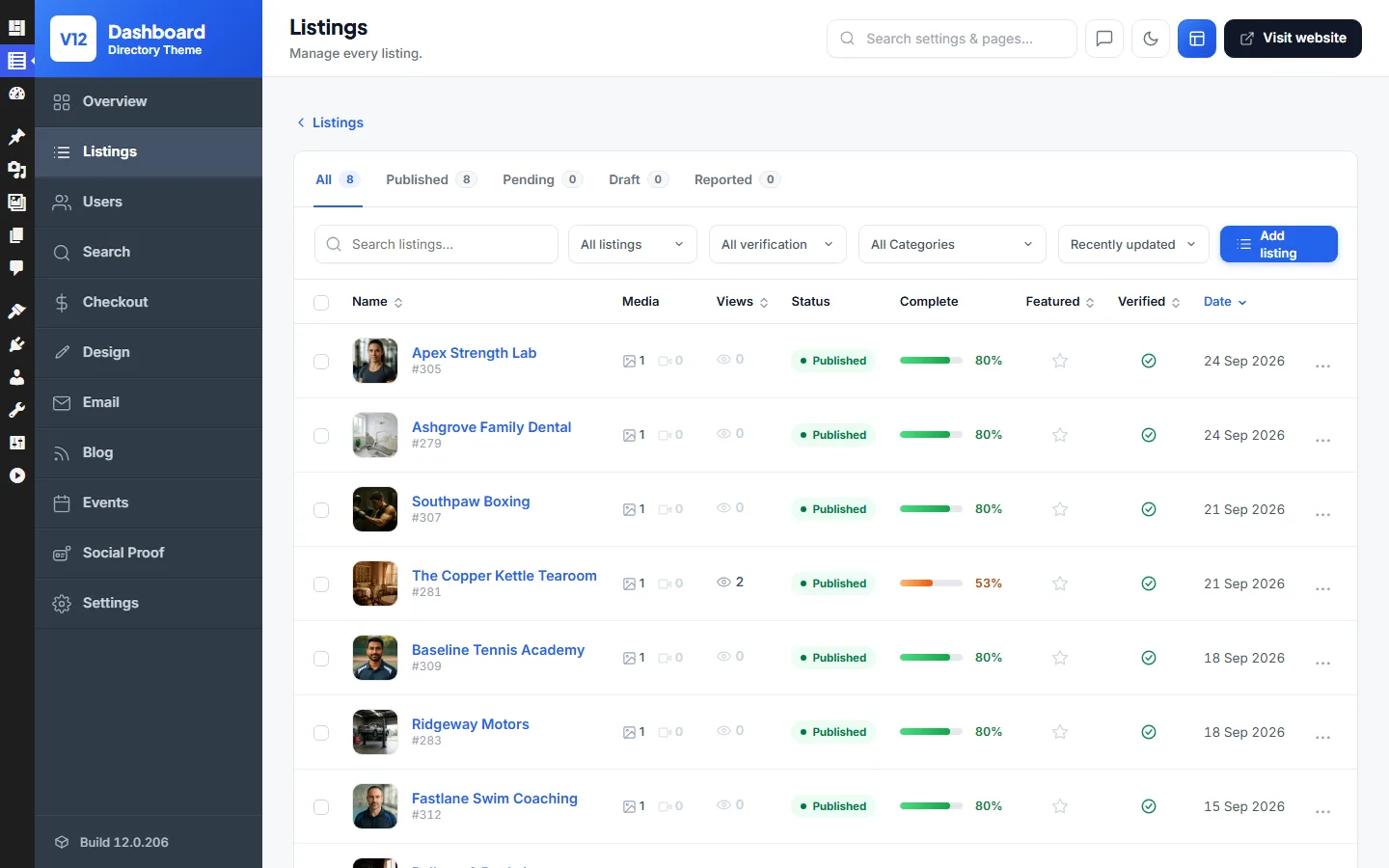
Manage Every Listing
Every listing in one list: search and filter them, see what's pending or reported, and check views, completeness, Featured and Verified at a glance.
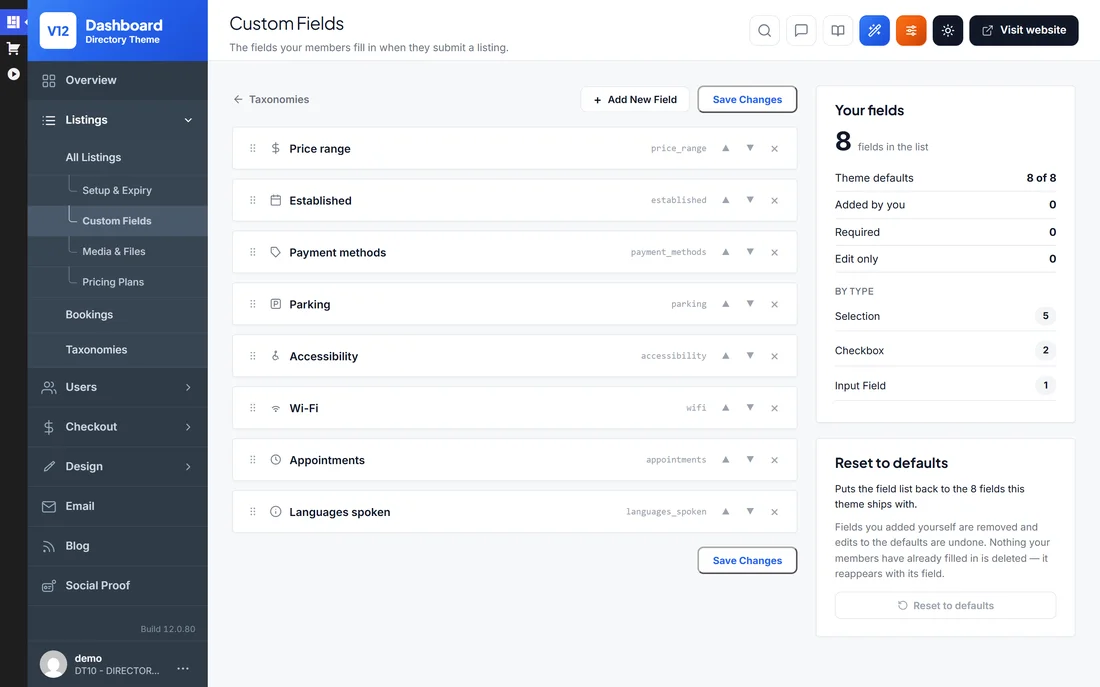
Custom Fields
Add the details your niche needs, like parking, accessibility, Wi-Fi or languages spoken.
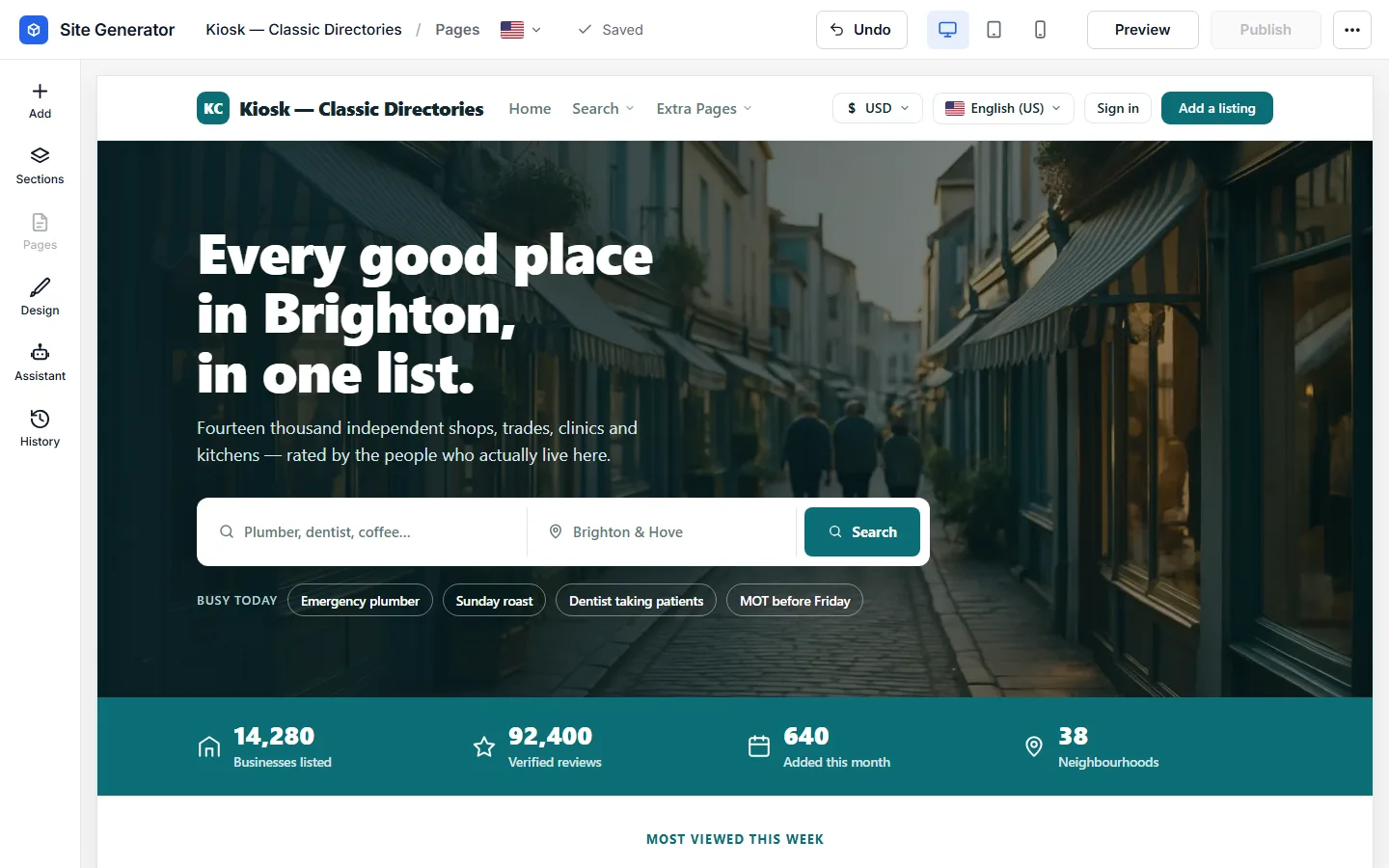
Shape Every Page
Site Generator Page Builder
Build your homepage and pages from ready-made sections. Add, move and change them right on the page, and check how it looks on desktop, tablet and phone before you publish.
Logo & Brand Colours
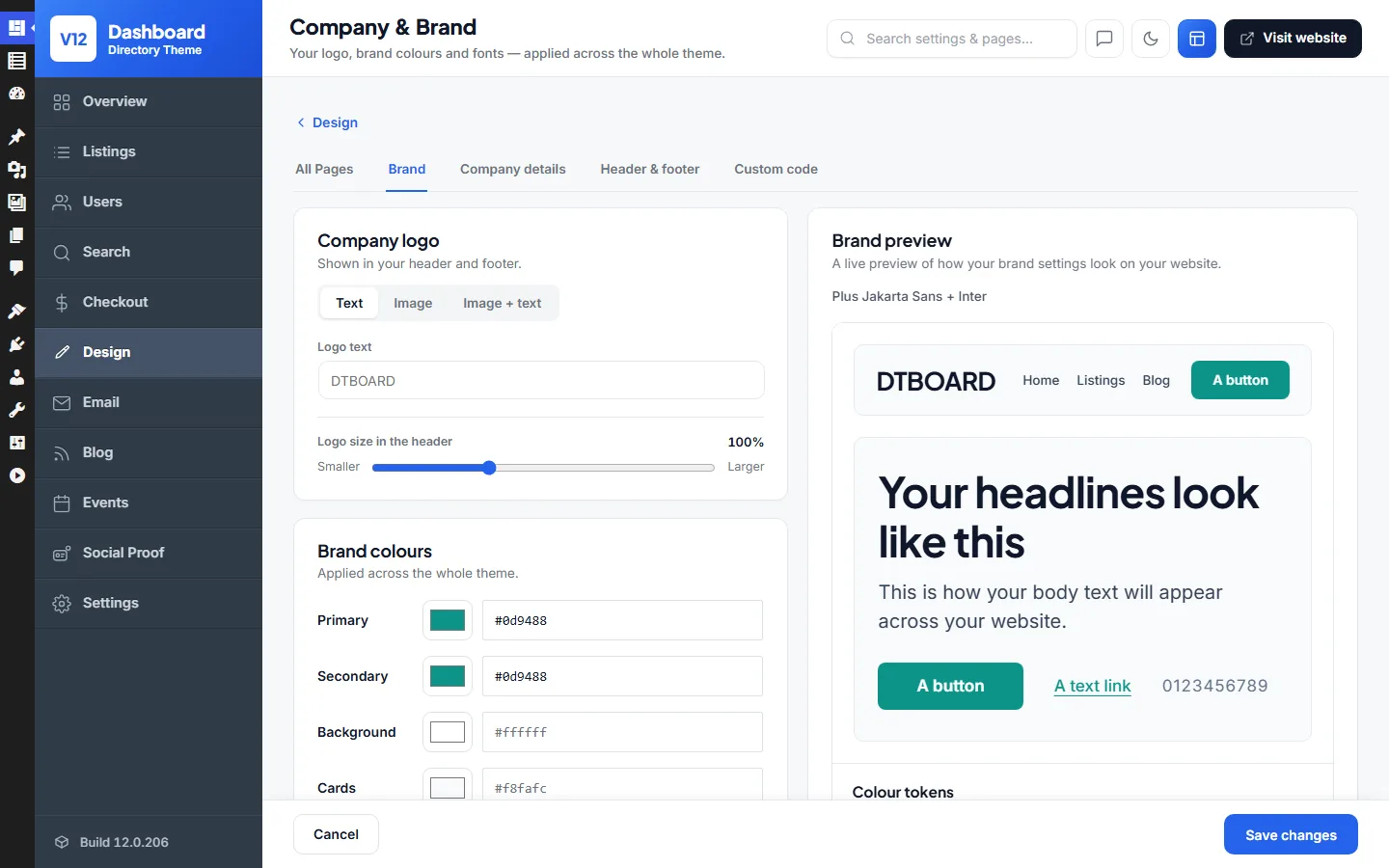
Add your logo, pick your brand colours and fonts, and see a live preview of how your site will look before you save.
Edit Any Listing
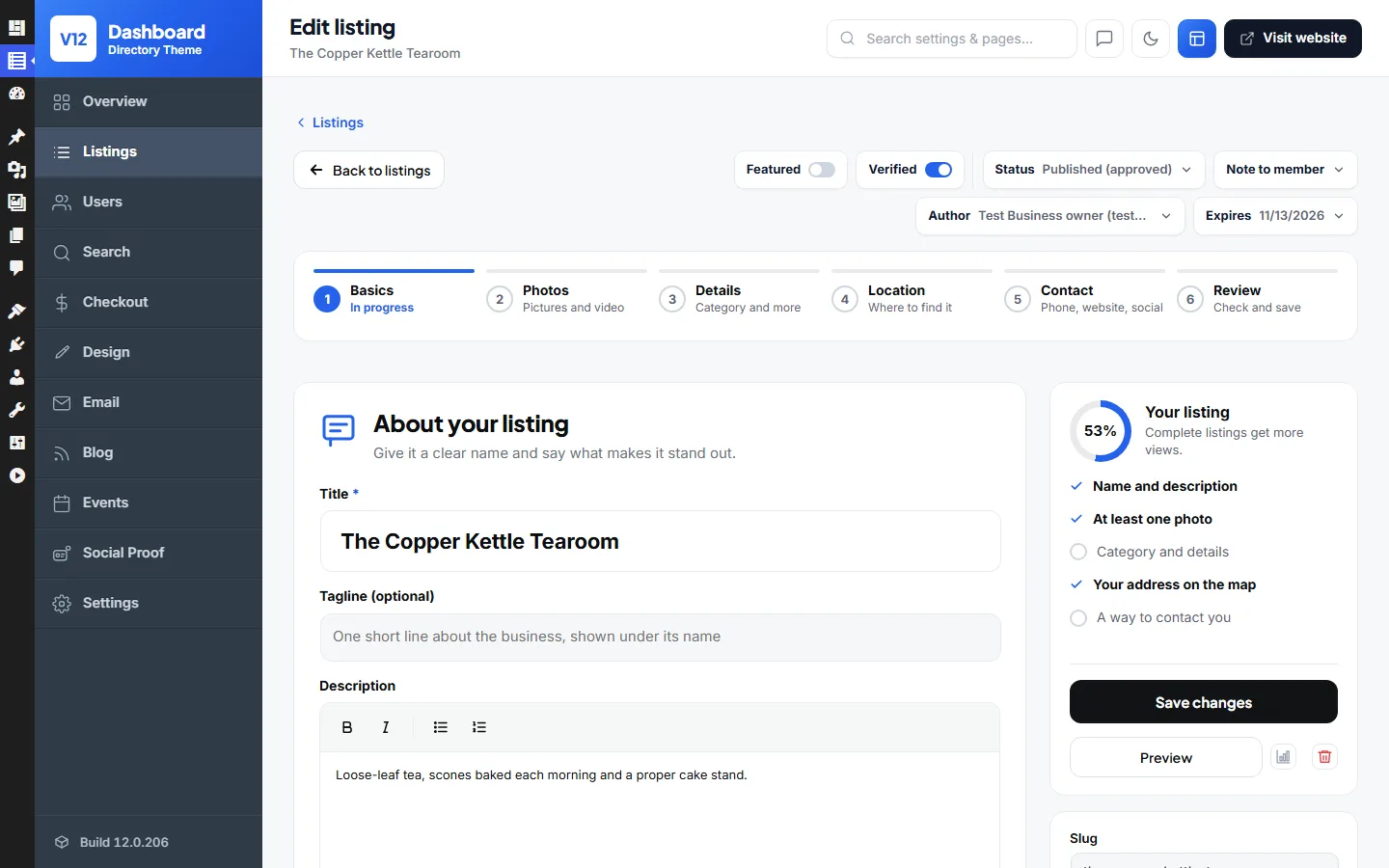
Open any listing in the admin to change its details step by step, mark it Featured or Verified, change its owner, status or expiry date, and see how complete it is.
Make It Look Like Your Business
Change the colours, fonts and logo in a few clicks, or design every page with Elementor if you already use it.
Your Colours, Fonts & Logo
Pick your brand colours, fonts and logo once, and every page follows. No code and no theme files to edit.
Works with Elementor
Prefer Elementor? Drag the directory’s own blocks, like hero searches, listing grids and review strips, into any page you build with it.
No Page Builder Plugins Needed
The theme comes with its own site editor. Add sections, change words and pictures right on the page, and publish, all without installing anything else.
Everything Built In
The everyday things a directory needs come with the theme, so there are no extra plugins to buy or set up.
Automatic Emails
Members get an email when a listing goes live, a message arrives or a review is left.
Any Language
Install any of 13 ready-made translations in one click, or add your own translation for any other language.
Works on Any Screen
Every page fits phones, tablets and desktops, with no extra work.
One-Click Demo Import
Start with the demo pages, listings and categories, then make them yours.
Unlimited Installs
Use the theme on as many of your own websites as you like.
Video Tutorials
Short videos show you how to set up every part of your directory.
Social Proof
Small pop-ups show visitors what's happening: new listings, fresh reviews and how many people are browsing.
SMS Messages
Send members their verification codes by text message through Twilio, Vonage, MessageBird or Plivo.
Social Login
Members sign in with their Google, Facebook, Twitter, Apple and other accounts, with no new password to remember.
Spam Protection
Google reCAPTCHA on the sign-up and login forms, and a block list for throwaway email addresses.
Built-In Blog
Write guides and news for your directory to bring in visitors from search engines.
Events
List local events with dates, times and places, so visitors have another reason to come back.
Directory Theme vs the Alternatives
How it compares with the most popular directory themes and plugins, and what each one costs.
| Directory Theme | ListingPro | Listeo | MyListing | Directory plugins | |
|---|---|---|---|---|---|
| Price (year 1) | $99 one-time | $69 | $119 | $119 | Free core + $49–$153 / yr add-ons |
| Sites per licence | Unlimited (sites you own) | 1 site | 1 site | 1 site | 1 site to unlimited, by plan |
| Renewal | None | Optional support renewal | Optional support renewal | Optional support renewal | Every year |
| Paid listings built in | Yes | Yes | Via WooCommerce | Via WooCommerce | Paid add-on |
| Claim-a-listing built in | Yes | Yes | Via WooCommerce | Via WooCommerce | Paid add-on |
| Payment gateways built in | 146 incl. PayPal & Stripe | Stripe, PayPal, 2Checkout, bank | WooCommerce required | WooCommerce required | GetPaid or WooCommerce |
| Extra plugins required | None | None for payments | WooCommerce | WooCommerce + Subscriptions | 2–3 add-ons + payments plugin |
| AI site builder | Yes | — | AI search & summaries | — | — |
| 100% open source (GPL) | Yes | Proprietary | Proprietary | Proprietary | Core is GPL |
Competitor prices and features checked on 10 September 2026 against each vendor's own page. ListingPro, Listeo and MyListing are ThemeForest Regular licences. “Directory plugins” covers GeoDirectory and Directorist, whose free cores need paid add-ons to charge for listings.
How to Build a Business Directory Website with WordPress
Six simple steps to your own business directory website. Local businesses pay to be listed, visitors search your site to find them, and you earn from every paid listing. It all runs on WordPress, with no coding required.
- 1
Add the Directory Theme to WordPress
Add the Directory Theme under Appearance → Themes and activate it. Paid listings, map search and custom fields are all part of the theme.
- 2
Get Updates with Your Licence
Pop in your licence key to switch on updates and support. One key covers every directory site you own.
- 3
Load the Demo Directory
One click imports the demo directory with sample business listings, categories and map-search pages. You customise a working directory instead of building from blank.
- 4
Add Your Directory Categories and Listings
Set up your directory categories and add listings, or let businesses submit their own.
- 5
Enable Paid Listings and Map Search
Turn on paid and featured listings, reviews and map search, and set your prices.
- 6
Customise the Design with Elementor
Restyle headers, listing pages and layouts with the 200+ Elementor directory blocks. Then put your business directory live.
WordPress Directory Theme FAQ
Answers to the questions directory owners ask us most.
Install the WordPress Directory Theme on any WordPress site, import the demo directory and add your categories and listings. Or let businesses submit their own. Map search, reviews and paid listings are built in, so there's nothing extra to wire together and no coding involved.
Yes. That's exactly what the theme is built for. You get Yelp-style listing pages with photos, opening hours, Google Maps, customer reviews and star ratings, plus zip/postcode radius search so visitors can find businesses near them.
Yes. Paid listings, claim-a-listing and PayPal/Stripe payments are built into the theme, so no extra directory plugins are needed. Businesses register, create and manage their own listings from the front end. You decide what's free and what's paid, and featured placement, homepage spots and sponsored ads can all be charged for. Owners can also claim listings you've pre-added, which is a great way to seed a new directory.
Yes. Every directory page can be edited in the free Elementor plugin. The theme ships with 200+ directory blocks, such as hero search bars, listing grids, category strips and map sections, and you drag them into place.
Yes. The one-click import recreates the live directory demo on your own domain, with sample listings, categories and search pages included. You replace the placeholder businesses with real ones instead of starting empty.
No. Approving listings, setting listing prices, moderating reviews and changing the design all happen in the admin area or the free Elementor editor. Video tutorials walk through the directory setup step by step.
Yes. Listing pages, map and radius search and the business submission forms all adapt to small screens. Visitors can browse the directory, and owners can manage their listings, from any phone or tablet.
Yes. A User License covers unlimited directory websites that you own. Run a city directory, a trades directory and a niche directory side by side on one licence. If you build directories for clients, choose the Developer License instead.
Yes. If your site runs MyListing, ListingPro, Listeo, Listivo or Listify, activate the Directory theme on the same website and use Settings › Migrate to convert every listing, photo, owner and review in place. Any other site can be imported from a CSV file.
No, and nulled copies of the Directory Theme are worth avoiding. They're outdated and often bundle malware, which is a real risk on a site that stores business details and takes listing payments. The licensed theme is a one-time purchase with 6 months of updates and support and a 14-day money-back guarantee.
There's a 14-day money-back guarantee. Import the demo directory, load some listings and test the paid-submission flow on your own hosting. If the theme doesn't fit, contact us within 14 days for a full refund.
The Directory Theme is updated regularly for WordPress compatibility and new features, and every purchase includes 6 months of updates and support. Extending after that is optional at $49 per 6 months. Your directory keeps working either way.
No. Everything a directory needs is in the theme, from listings and paid submissions to maps, reviews and search. It works with free plugins such as Elementor. Beyond your hosting and domain, the only optional cost is extending updates and support after the first 6 months, at $49 per 6 months.
What Customers Say About the Directory Theme
Rated 5.0 out of 5 by our customers.
“I hired a few developers to work on a normal WordPress theme but it cost me an arm and a leg! Working with this theme was much easier and faster. You can easily change the design as you prefer, save lots of time to communicate on color, small changes, etc. Thanks guys.”

Gary
“Thanks for everything Mark, Iv had a directorypress theme since version 7 and the updates just keep getting better.”
Mateus Graz
“well built themes, they load fast, code is clean and optimised for seo”
Alistair Kelsall
“Honestly, your themes are great! Thank you.”

Temmy Flavianus
“I have been using Directory Press since 2012, good value for money and I always look forward to the next updates.”

Alan Johnston
“I love this directory, it makes it very easy to add listings with a couple of clicks. I love the customer service they make many things work like a charm. Great value for the money”
Horacio Ramos
How the Directory Theme Compares
- Best WordPress Directory Themes in 2026: ListingPro vs Listeo vs MyListing vs Directorist vs GeoDirectory vs PremiumPressAn honest 2026 comparison of the seven WordPress directory themes buyers actually choose between, ranked on verified sales, whether paid listings, claims and payments are built in without extra plugins, and real first-year cost.
- ListingPro Alternatives in 2026: Six Directory Themes and Plugins ComparedWhy people leave ListingPro over its one-site licence, speed and design, and an honest comparison of the six alternatives buyers actually consider. Listeo, MyListing, PremiumPress, Directorist, GeoDirectory and ListingHive, with checked 2026 prices.
- Listeo Alternatives in 2026: Cheaper Directory Themes With and Without BookingsListeo is the most expensive single-site directory theme and runs every payment through WooCommerce. Here are the six alternatives compared honestly on price, payments, licences and bookings, with prices checked in September 2026.
- WordPress Directory Theme vs Directory Plugin: GeoDirectory, Directorist and the Themes ComparedTheme or plugin for a WordPress business directory? Cost to charge for listings, setup time, scale and lock-in compared across ListingPro, Listeo, MyListing, PremiumPress, GeoDirectory and Directorist with 2026 prices.
Related WordPress Themes
- WordPress Classifieds ThemeCreate your own classifieds website similar to GumTree or Craigslist.
- WordPress Real Estate ThemeCreate your own real estate website similar to Rightmove, Zillow or Redfin.
- WordPress Job Board ThemeCreate your own job board website similar to Indeed, CareerBuilder or ZipRecruiter.