All-in-One WordPress Theme
for Price Comparison Websites
Create your own price comparison site with shop feeds, price history, affiliate links, and AI site building with your own AI account.


Popular Price Comparison Features
Offer tables, price feeds and affiliate links all ship inside the Price Comparison Theme.
Every Shop, One Table
Each product lists every shop’s price side by side, cheapest first, with delivery shown.
Price History
A price history chart on each product shows shoppers whether today’s price is a good one.
Daily Price Feeds
Import offers from AWIN, CJ or any shop’s own CSV or XML feed, and refresh them every day.
A Comparison Site
for Every Niche
From electronics and fashion to fishing tackle and web hosting, each kind of comparison site has its own look and sample products. Choose one and add your first shops.
Everything-Store Comparison
Compare prices on anything, from kettles to trainers.

Electronics & Tech
Rank laptops, phones and headphones by live price.

Fashion & Clothing
Show coats, bags and trainers from hundreds of stores.

Snacks & Drinks
Help shoppers find the best deal on snacks and drinks.

Fishing Tackle
Compare rods, reels and tackle for anglers.

Web Hosting & Software
Compare hosting plans, software and subscriptions.

Choose Your Comparison Design
Every design is ready for real products: swap in your own shops, feeds and colours.


The Price Comparison Playbook
How to plan, build and grow a price comparison website that shoppers trust and retailers want to be on. 34 pages, from choosing a niche to your first 90 days.
Make Money From Your Comparison Site
Earn commission when shoppers buy through your shop links, and sell Featured spots and advert space on top.
Commission on Every Sale
Shoppers click Go to shop on the best offer, and when they buy you earn the shop’s affiliate commission through your network.
Featured Products
Put a product first on the homepage and in search, for as many days as you decide, or sell the spot to a brand.
Sell Advert Space
Shops and brands buy banner space in the ad zones you switch on, on the homepage, in categories and on product pages.
146 Payment Gateways
Advertisers pay through PayPal, Stripe or any of 144 other gateways, straight into your own account.

Affiliate Links Built In
Offers from AWIN and CJ feeds arrive with your tracking links, so every Go to shop click can earn.
Easy Search, Product Pages That Send Clicks
Shoppers should find the product fast and see every shop's price before they click through to buy.
Search Every Product
Shoppers search by keyword and category and see each product with its lowest price and how many shops sell it.
Product Pages That Send Clicks
Every product gets its own page with photos, reviews and every shop’s offer, each with a Go to shop button.
Custom Search Filters
Let shoppers narrow it down by price, category and any spec you add, in the order you want.
Product Specs & Custom Fields
Add your own spec fields, like battery life or weight, so shoppers can compare products as well as prices.

One Product, Every Shop
Prices update every day. The theme pulls each shop’s feed, matches its offers to your products and keeps a record of every price, so the history chart fills itself in.
No feed? No problem. Enter a shop’s offers by hand, or let the theme read prices from the shop’s own product pages.
A Dashboard for Shoppers and for You
Saved products and reviews for shoppers, and shops, feed imports and offers for you.
For Shoppers

For You, the Site Owner

What Members Get in Their Account
Shoppers save products, write reviews and manage their account without ever seeing WordPress, with the checks you require.
Verification tools
Ask new members for a confirmed email or phone, photo ID or your own sign-off before their account goes live.
Two-factor login
A sign-in code protects member accounts, and staff can be made to use one.
Write a review
Shoppers rate and review products from the product page. You choose which products take reviews.
Saved products
Shoppers save the products they like and find them again under Saved, next to the ones they viewed.
Saved searches
Members keep the searches they run often and open them again in one click.
Account & privacy
Members pick which emails they get, see new sign-ins and can close their account, held for 30 days first.
Every Product, Shop and Feed in One Admin
Add shops, watch the daily imports and keep thousands of offers up to date from one dashboard.
Try the admin demoOne Dashboard
Track new products, new members and revenue over the last week, month or quarter, with anything waiting for you at the top.

Manage Every Product
All your products side by side with their status and how complete they are, filtered by status in a click.

Shops & Feeds
Add each shop with its affiliate link, delivery cost and product feed, and the daily import keeps its offers fresh.

Search Filters
Turn on filters such as price, category or your own specs, and set the order shoppers see them in.

Design Your Comparison Pages
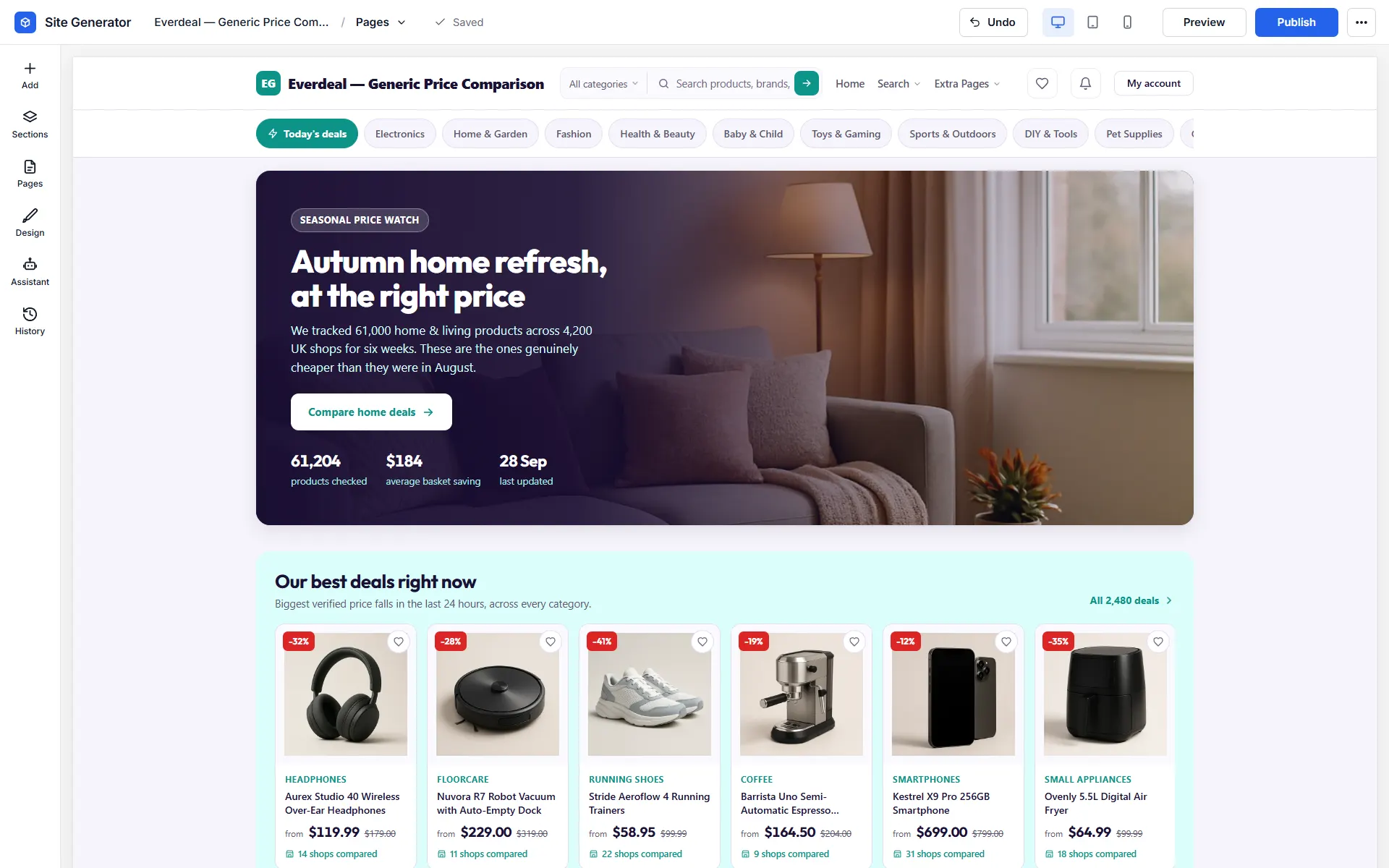
Site Generator
With your own AI account connected, describe your comparison site and the generator drafts every page. Ask it for a top-deals row or a new hero search, or arrange the blocks by hand.
Logo & Brand Colours
Put your site name, logo and colours on every page, checked in a live preview first.

Your Comparison Site, Your Look
Make it feel like a big shopping search engine or a small specialist guide, whichever suits your shoppers.
Your Colours, Fonts & Logo
Set your brand colours and type, and product pages, offer tables and search results all match.
Works with Elementor
Designing in Elementor? Drag the 150+ comparison blocks, like hero searches, top-deal carousels and shop rows, straight onto your Elementor pages.
Build Your Site Without Extra Plugins
Lay out your homepage, category pages and deal rows in the theme’s own editor, then go live.
Ready on Day One
Emails, translations, anti-spam and sign-in options for your shoppers are already in place.
Automatic Emails
Members get a welcome email, a note when their review goes live and a password reset when they need one.
Any Language
Run a comparison site for shoppers in another country with 13 ready-made languages, or add another.
Works on Any Screen
Shoppers compare prices on their phone in the shop, so every offer table and product page is sized to fit.
One-Click Demo Import
Load a ready-made comparison site with sample products, shops and offers, then add your own feeds.
Unlimited Installs
Run separate comparison sites, say one for tech and one for fishing tackle, on the same licence.
Video Tutorials
Watch how to add shops, set up feeds and build your pages in short video guides.
Social Proof
Small pop-ups show saved products and new reviews, and how many people are comparing prices right now.
SMS Messages
Send members their security codes by SMS through Twilio, Vonage, MessageBird or Plivo.
Social Login
Shoppers sign up in seconds with Google, Facebook, Twitter or Apple, ready to save products straight away.
Spam Protection
Bot accounts are kept out with reCAPTCHA and a ban on throwaway email addresses.
Built-In Blog
Write buying guides and deal round-ups to bring in shoppers from search engines.
Reviews & Ratings
Shoppers leave star reviews on products, and you can switch reviews and comments on or off per product.
Price Comparison Theme vs the Alternatives
You don't need a stack of affiliate plugins or a yearly subscription. This is a complete comparison website for one price.
| Price Comparison Theme | ReHub | Affiliate plugins | |
|---|---|---|---|
| Price | $99 one-time | $59 + extras | $39–$249 / yr |
| Unlimited installs | Yes | 1 site | 1 site |
| AI site builder | Yes | — | — |
| Affiliate links & price fields | Built in | Yes | Varies |
| Renewal / monthly fees | None | Renewals | Renewals |
| 100% open source | Yes | Proprietary | Mixed |
| Works with Elementor (free) | Yes | Yes | Varies |
How to Build a Price Comparison Website with WordPress
Six simple steps to your own price comparison website. Import product feeds, compare prices across shops, and earn a commission on every affiliate link. It all runs on WordPress, with no coding required.
- 1
Add the Price Comparison Theme
Add the Price Comparison Theme via Appearance → Themes and activate it. Comparison tables and feed imports are native to the theme.
- 2
Switch on Updates with Your Licence
Your key switches on updates and support and is valid across every comparison site you own.
- 3
Import the Demo Comparison Site
Importing the demo gives you a comparison site with sample products and merchants in place. It's a working reference to build on.
- 4
Add Products and Merchants
Add the products and merchants you want to compare, by hand or by importing product feeds.
- 5
Set Up Price Feeds and Affiliate Links
Configure your price feeds and affiliate links so every comparison earns you commission.
- 6
Customise the Design with Elementor
Compose your comparison pages from the 150+ Elementor blocks, like price tables, deal strips and category grids, and launch.
WordPress Price Comparison Theme FAQ
Common questions from people planning a price comparison website.
Install the WordPress Price Comparison Theme, import the demo and load your products, by hand or from merchant feeds. Price tables, retailer links and your affiliate tags are handled by the theme, so comparisons start earning without any coding.
Yes. Product pages that line up prices from multiple retailers, category browsing and search are the theme's core, PriceRunner-style. Your affiliate commission is attached to every click-out.
Yes. You can import product and merchant feeds so shoppers compare prices across retailers, with your affiliate links applied automatically.
Yes. Comparison tables, product grids and category pages are all built from 150+ Elementor blocks, edited visually in the free plugin.
Yes. One import recreates the demo site with sample products, merchants and comparison pages, so you can study a working comparison flow before wiring up real feeds.
Yes. Feeds, merchants, products and affiliate settings are managed in the admin area, and page design is Elementor drag-and-drop. Video tutorials walk through the setup.
Yes. Shoppers compare prices mid-purchase on their phones, and the comparison tables, filters and product pages are built to stay readable at that size.
Yes. Separate comparison sites per product vertical, such as tech, appliances or outdoor gear, can all live on the one User License. It permits unlimited installs on your own sites. The Developer License covers client work.
No. Skip the nulled copies. A comparison site's earnings ride on its affiliate links, and pirated themes are notorious for silently swapping those for someone else's. The genuine theme is one purchase, with 6 months of support and a 14-day guarantee.
Yes. You get a 14-day money-back guarantee, which is plenty to import the demo, connect a test feed and click through the affiliate flow before making the call.
Yes. Purchases include 6 months of updates and support to keep pace with WordPress releases. Extending beyond that is an optional $49 per 6 months.
No. Feed imports, price tables, affiliate link handling and payments are theme features, and the only plugins alongside them are free ones such as Elementor. Aside from hosting and a domain, the sole optional cost is support renewal after the first 6 months.
What Customers Say About the Price Comparison Theme
Comparison site owners give it 5.0 out of 5.
“Great and Easy to use, help a lot, thx!”

Tak Shing Szeto
“Excelent theme in present market it working like as I expected.thank you!!”

Naga Raju
“Nice Theme with cool functions.”

To Bi
“When I first started out with the idea of making a price comparison website I had so many different things to think about but PremiumPress helped me with setting up my website which made my life a lot easier. I'm not a computer genius and probably wouldn't have this fantastic website if it wasn't for PremiumPress. I would recommend them to anyone.”

Michael Kenyon
“well built themes, they load fast, code is clean and optimised for seo”

Alistair Kelsall
“I found the service really good although I did have to go watch some of the videos to understand some features. Support is really good.”

Dharmaraj Thapa
Related WordPress Themes
WordPress Cashback Theme
Create your own cashback website similar to Topcashback, Rakuten or Quidco.
WordPress Coupon Theme
Create your own coupon website similar to Coupons.com, RetailMeNot or Rakuten.
WordPress Classifieds Theme
Create your own classifieds website similar to GumTree or Craigslist.