All-in-One WordPress Theme
for Auction Websites
Create your own eBay-style website with live bidding, seller fees, penny auctions, and AI site building with your own AI account.


Popular Auction Website Features
The bidding engine and everything around it ship inside the Auction Theme.
Live & Timed Bidding
Bids and prices update every few seconds, with a live countdown on every lot and an end time you set per lot.
Proxy & Automatic Bidding
Bidders set a maximum and the site bids for them, one increment at a time, up to that limit.
Reserve, Buy Now & Increments
Set a hidden reserve, an optional buy-it-now price and the bid increment for each lot.
An Auction Site
for Anything
From art and antiques to livestock and charity nights, each kind of sale has its own looks and sample lots. Choose one and list your first items.
Art, Antiques & Rare Books
Run catalogue sales of paintings, antiques and first editions.

Collectibles & Memorabilia
Sell coins, toys, cards and memorabilia to keen collectors.

Watches & Jewellery
Auction watches and jewellery with reserves and buy it now.

Wine & Spirits
Sell fine wine and spirits by the bottle or the case.

Property & Land
Auction homes, land and commercial property online.

Cars & Boats
Sell classic cars, everyday cars and boats to the highest bidder.

Livestock & Bloodstock
Run online sales of horses, cattle and other livestock.

Machinery & Equipment
Auction tractors, plant and equipment to trade buyers.

Tech & Surplus Stock
Clear surplus stock, laptops and returns at auction.

Instruments & Records
Sell guitars, pianos and records to music lovers.

Charity Auctions
Raise money with online charity and fundraising auctions.

Choose Your Auction Design
Every design is ready for real lots: swap in your own sale, pictures and colours.


The Auction Site Playbook
How to plan, build and grow an auction website that people trust with their money. 40 pages, from choosing a niche to your first 90 days.
Make Money From Your Auction Site
Earn when a lot is listed, when it sells and when bidders buy credits, at the rates you set.
Seller Plans
Sell seller plans with their own limits, like how many lots can be live, and perks such as free Featured lots each month.
Featured Lots
Sellers pay to put a lot first on the homepage and in search, for a length of time you decide.

Paid on Every Sale
When a lot sells, the seller is emailed an invoice for your commission. Buyers pay through your own gateways.
Penny Auction Credits
Bidders buy credit packs through your payment gateways, and every bid in a penny auction uses one credit.
146 Payment Gateways
Winning bidders pay through PayPal, Stripe or any of 144 other gateways, into your own account.
Fees, Commission & Buyer's Premium
Add a listing fee, a final-value commission and a buyer’s premium. The theme works them out on every sale.
Easy Search, Lot Pages That Sell
A bidder should reach the right lot fast and trust what they see before placing a bid.
Search & Filters
Bidders search by keyword, category and price, see what’s ending soon and find lots near them.
Lot Pages That Sell
Every lot gets its own page with a photo gallery, a live countdown, the bid box and the number of bids so far.
Custom Search Filters
Let bidders filter by price, ending soon, buy it now and any field you add, in the order you want.
Lot Details & Custom Fields
Every lot has a starting bid, increment, reserve and buy-it-now price. Add your own fields too, like condition or maker.
Find Lots Nearby
Search by postcode or zip code. Handy for cars, machinery and livestock that buyers need to collect: set a radius and the nearest lots come first.
Google Maps, Mapbox or OpenStreetMapplot each lot, and OpenStreetMap works with no key to set up.
A Dashboard for Bidders and Sellers
Bids, wins and payments for buyers, and lots, sales and ratings for sellers, each in their own place.
For Bidders

For Sellers

What Members Get in Their Account
Bidders and sellers manage lots, bids and payments without ever seeing WordPress, with the checks you require.
Verification tools
Before anyone can bid or sell, ask for a confirmed email or phone, photo ID, a card check or your own sign-off, so every lot changes hands between real people.
Two-factor login
A sign-in code protects accounts that hold winning bids and payouts, and staff can be made to use one.
List a lot
Sellers list a lot step by step from the front of the site, with photos, prices and an end time.
Watchlist
Bidders save lots to their watchlist, so they can come back before the lots end.
Invoices & billing
Wins, fees and payments are kept in the account, each with its own invoice to download.
Account & privacy
Bidders pick which outbid and win emails they get, see new sign-ins and can close their account, held for 30 days first.
Every Lot, Bid and Seller in One Admin
Approve new lots, watch bids come in and keep the sale running from one dashboard.
Try the admin demoOne Dashboard
Track new lots, new members and revenue over the last week, month or quarter, with orders to process at the top.

Manage Every Lot
All your lots side by side with their current bid, bid count and time left, filtered by status in a click.

Every Bid in One List
Every bid placed across your lots, with the bidder, the amount and when it came in, and the leading bid marked.

Search Filters
Turn on filters such as ending soon, price or nearby, and set the order bidders see them in.

Design Your Sale Pages
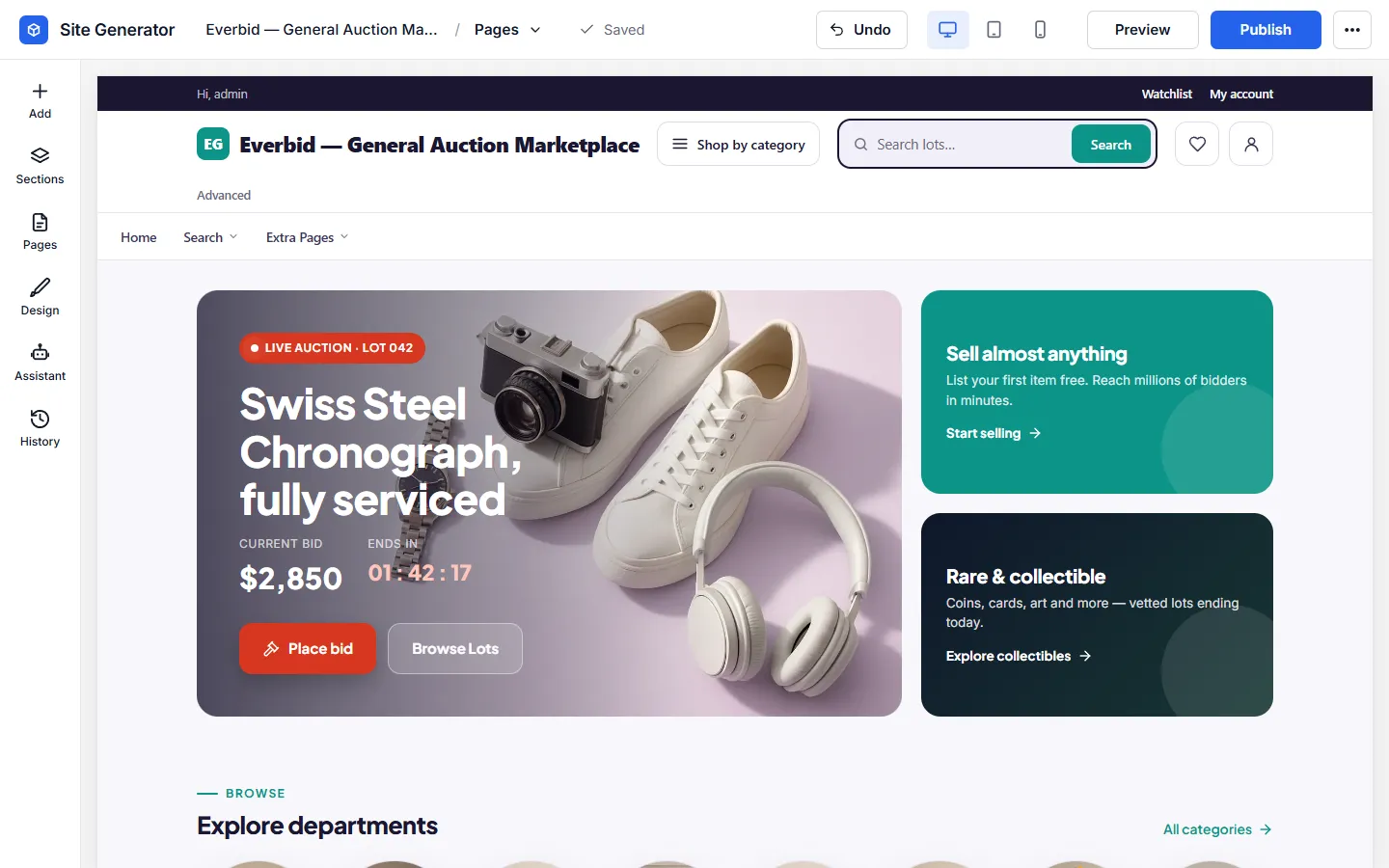
Site Generator
With your own AI account connected, explain your auction house and the generator drafts every page. Ask it for an ending-soon row or a new hero lot, or arrange the blocks by hand.
Logo & Brand Colours
Put your auction house name, logo and house colours on every page, checked in a live preview first.

Your Auction House, Your Look
Make it feel like a saleroom, a marketplace or a charity gala, whichever suits your bidders.
Your Colours, Fonts & Logo
Set your house colours and type, and lot pages, catalogues and checkout all match.
Works with Elementor
Designing in Elementor? Drag the 150+ auction blocks, like live-bid panels, lot carousels and countdown strips, straight onto your Elementor pages.
Build Your Sale Pages Without Extra Plugins
Lay out your sale pages, featured lots and seller sign-up in the theme’s own editor, then go live.
Ready on Day One
Bid emails, translations, anti-spam and sign-in options for your bidders are already in place.
Automatic Emails
Bidders get an email when they are outbid or win, and sellers when a lot ends below its reserve.
Any Language
Open your sale to bidders abroad with 13 ready-made languages, from German to Japanese, or add another.
Works on Any Screen
Bidders follow countdowns and place bids from their phone, with every lot page sized to fit.
One-Click Demo Import
Load a ready-made sale with sample lots and categories, then swap in your own items.
Unlimited Installs
Run separate auction sites, say one for cars and one for art, on the same licence.
Video Tutorials
Watch how to set up lots, bidding rules and payments in short video guides.
Social Proof
Live pop-ups announce new bids and winners, and show how many people are bidding right now.
SMS Messages
Send bidders their security codes by SMS through Twilio, Vonage, MessageBird or Plivo.
Social Login
New bidders register in seconds with Google, Facebook, Twitter or Apple, ready to bid straight away.
Spam Protection
Bot accounts are kept out with reCAPTCHA and a ban on throwaway email addresses.
Built-In Blog
Write guides and news for your auction site to bring in bidders from search engines.
Bid History
Every bid on a lot is kept in order, with the leading bid marked, so bidders can see how a lot is going.
How to Build an Auction Website with WordPress
Six simple steps to your own auction website. Sellers list their items, buyers bid, and you earn a fee on every sale. It all runs on WordPress, with no coding required.
- 1
Set Up the Auction Theme
Add the Auction Theme to your WordPress site under Appearance → Themes and activate it. The bidding engine ships inside the theme, so no auction plugin is needed.
- 2
Activate Updates & Support
Activate with your licence key to receive updates and support. The same key works across all auction sites you own.
- 3
Import the Demo Auction House
One click imports the demo auction house with sample lots, categories and bidding pages. You can watch an auction run before adding real items.
- 4
Add Your Auction Listings
Create auction listings with photos, descriptions, start prices and end times. Or let members list their own items.
- 5
Enable Bidding and Payments
Switch on live bidding, buy-now and PayPal payments, and set your listing fees and commissions.
- 6
Customise the Design with Elementor
Brand your auction house with the 150+ Elementor auction blocks, from featured-lot carousels to countdown strips, then launch.
WordPress Auction Theme FAQ
Common questions from people planning an auction site.
Install the WordPress Auction Theme, import the demo lots and set your listing fees. Bidding and proxy bids work straight away. Buy-it-now, anti-sniping and commissions are off by default, and you switch them on in the settings. You can run a test auction the same day with no coding required.
Yes. The theme follows the eBay model, with timed auctions, proxy bidding, hidden reserves, optional buy-it-now prices, seller accounts and feedback after every sale. The difference is that you set the fees instead of paying them.
Yes. Lots run on countdown timers, with bids and prices updating every few seconds. Proxy or auto bidding lets buyers set a maximum while the system bids for them. Each site runs one bidding type, chosen in the settings, and that can be timed, live or penny. Bidders get an email when they are outbid, and the winner gets an email with a link to pay.
Yes. Auction pages are editable in the free Elementor plugin, with 150+ auction blocks you drag into place. They include featured-lot carousels, countdown strips and bid panels.
Yes. The one-click import sets up sample lots, categories and auction pages matching the live demo, so you can watch a working auction run end to end before listing anything real.
Yes. Bidding rules, fees, seller approvals and design changes are all managed from the admin area or the free Elementor editor. Video tutorials cover the full auction setup.
Yes. Bidders can save lots to favourites, place bids and get outbid emails on their phones. Auction pages, the members area and checkout all resize to fit any screen.
Yes. A User License allows unlimited installs on auction sites you own, so you can run niche auction houses side by side. The Developer License covers client and commercial builds.
No. Free or nulled copies of the Auction Theme do circulate, but they're outdated and often carry malware. That's a serious risk on a site handling bids and payments. The genuine theme is a one-time purchase with 6 months of updates and support and a 14-day money-back guarantee.
Yes. Every purchase carries a 14-day money-back guarantee. Import the demo and run a test auction with proxy bids. If it's not the right fit, contact us within 14 days for a full refund.
Yes. 6 months of updates and support are included, which keeps the bidding engine compatible with new WordPress releases. Extending after that is optional at $49 per 6 months. Your site keeps running either way.
No. Bidding, seller accounts, commissions and outbid/won emails are all in the theme, and the 100+ payment gateways are free plugins. The only other plugin you're likely to add is the free Elementor for design. The single optional cost is extended updates and support after the first 6 months, at $49 per 6 months.
What Customers Say About the Auction Theme
Auction site owners give it 5.0 out of 5.
“I had a good experience working with Premiumpress, used the new auction theme and got some setup issues, support helped resolve my issues quickly and in a timely manner. Mark was very communicative and understanding of our needs. He also educated us on best practices and catered to all our wants.”

Hector Nelson
“Great service, very happy with my new auction website.”
Randy Crowthwr
“I wanted to say thanks for helping me fix my website and get me setup. Iv really enjoyed using your themes.”

Barry Rodgers
“So far so gooooooooooood! I would HIGHLY recommend this team for successful Website designer strategies! A+”

Alda Phillips
“The auction theme is very good. I love it, Thanks guys.”

Darrell Dowell
“Very nice theme auction great support thank you :)”

Pavel Multan
Related WordPress Themes
WordPress Classifieds Theme
Create your own classifieds website similar to GumTree or Craigslist.
WordPress Shop Theme
Sell your own products or affiliate products online from one ecommerce theme with the shop, checkout and payments built in.
WordPress Real Estate Theme
Create your own real estate website similar to Rightmove, Zillow or Redfin.